
Last modified: July 2, 2026
Staff: Ordering and managing labs
Staff
Staff members can help their team manage lab testing workflows in Fullscript—from adding lab tests to plans to tracking results. Once a provider is registered for labs, staff can create plans with testing on their behalf.
If you’re a provider looking to add staff to your account to help you with labs ordering and management, follow these steps.
Labs registration
Before staff can include lab tests in plans, the assigned provider must complete labs registration.
- This applies to both licensed providers and those using the authorization network.
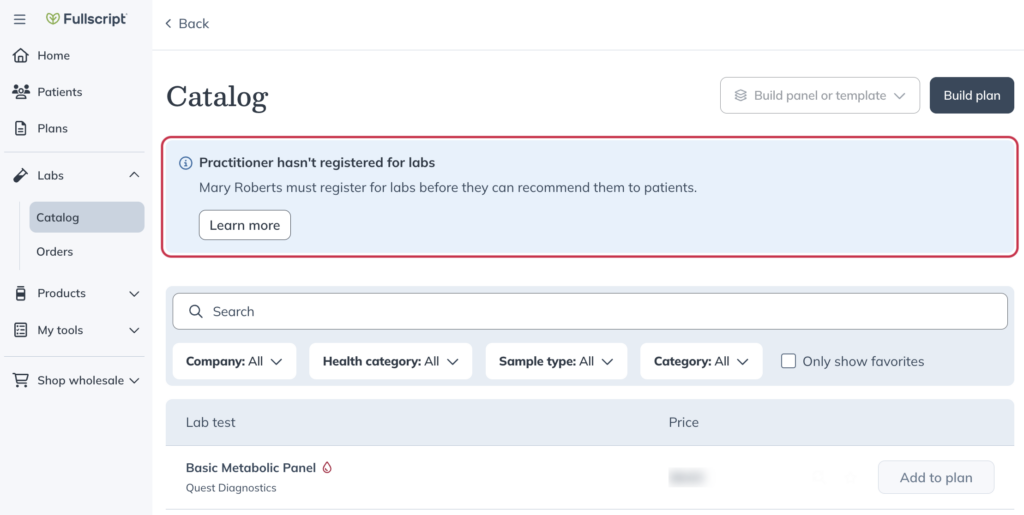
- If a provider hasn’t registered, staff will see a banner in the Labs catalog.
- Providers must register through their own account.
Staff access to lab tools
Once a provider is registered, staff can also:
- Create and edit custom panels
- Track a patient’s testing status
- View and share patient test results
- Access the team’s lab orders dashboard
Adding labs to a plan
Staff can add lab tests to a plan from the catalog, just like supplements.
If your practice uses a supported electronic health record (EHR) or another activated Fullscript integration, lab plans can also be created from your integrated system instead of directly in Fullscript.
Regardless of whether a lab plan is created in Fullscript or through an activated integration:
- Patients complete the same Fullscript checkout experience.
- Patient billing and payment are handled through Fullscript.
- Lab fulfillment and results follow the standard Fullscript workflow.
The only difference is where the lab order is created. With an activated integration, the order originates in your connected system and is sent to Fullscript automatically.
Video: Staff | Managing labs for your practice