
Track, review, and share lab results directly from your Fullscript account.
Labs on Fullscript offers both partial and complete results, so your team can view updates as they become available without waiting for the full report.
If you have a direct lab account and order tests through Fullscript, your results will appear only in your Fullscript account—not your lab portal. All your Fullscript lab results will be available in one place for easier access and tracking.
Video: Review and share lab results
Lab result notifications
When final lab results are ready, the ordering provider gets an email with a link to view them in their Fullscript account.
An email notification is sent for final results only, not partial results. You can access partial results at any time in your account, but you won’t be notified until the full report is ready.
Lab results email notifications are turned on by default. To change this:
- Click your profile button in the bottom-left corner of your account.
- Click Account settings.
- Select the Preferences tab.
- Click the Labs toggle to turn off Lab results notifications.
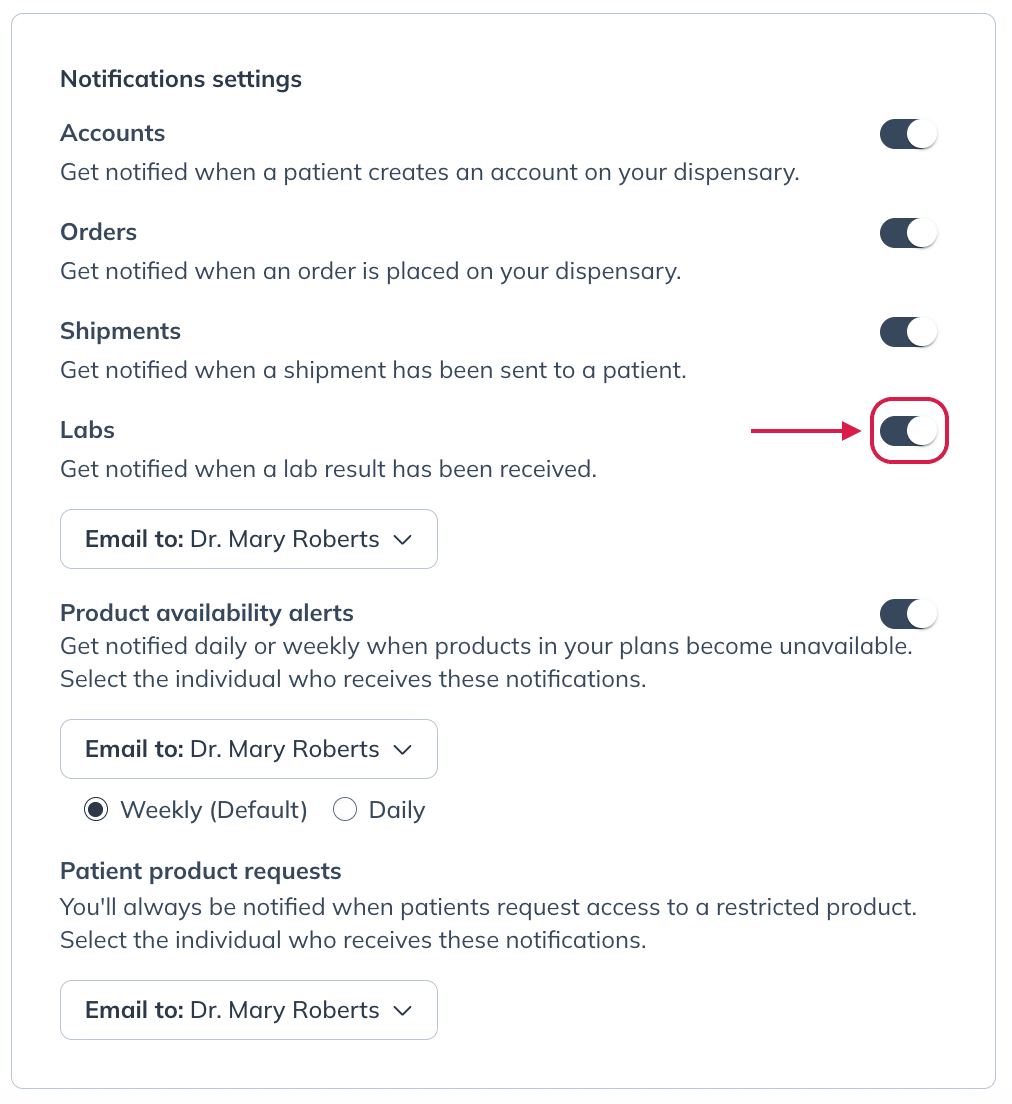
You can assign your lab alerts to another provider or staff member if it better supports your clinic’s workflow.
Viewing and downloading lab results
To access results from your account:
- Select Labs then select Orders in the left navigation.
- Search for your patient by name or email, or filter the Status dropdown to Results available.
- Select View results next to the relevant order.

The results page shows your patient’s results, with options to view test details and download results. It also includes:
- A patient card. If the lab was sent with the patient questionnaire, select Patient quick-look for more patient details.
- A Summary, the letter your patient receives. On specialty results, the Summary is optional.
- A note for each health area, on blood labs. Specialty results show the lab’s original report instead.
To learn how to review and edit these sections, see Lab interpretations and trends. For labs sent with the questionnaire, see Get a drafted interpretation and plan with lab results.
For partial results, you can view or download the results that are currently available.
Viewing blood lab interpretations
When interpretations are available for a lab, select View results from the Orders dashboard to review the results and interpretation. From there, select Build plan to create a plan with recommendations and follow-up based on the results, or Share results only to send the results without a plan. Once results are shared, Share results only is no longer available.
Lab interpretations are supported for eligible blood labs, including Quest Diagnostics, Access Medical Labs (AML), and Access Labcorp Draw.
If the lab was sent with the questionnaire, continue to the drafted plan to review it, then share the results and plan together. If you haven’t reviewed every health-area note, you’ll be prompted to review them first.
After you share, you can still edit the Summary and health-area notes. To change a plan you’ve already sent, edit it and select Update plan.
Managing and sharing lab results
You can manage results directly from the lab orders dashboard without opening the results.
To manage a lab result:
- Go to Labs and select Orders.
- Find the relevant lab order.
- Select More.
- Choose an available action:
- Mark results as reviewed to update the result's review status without sharing it with the patient.
- Share results with patient to send the results to your patient.
- Download results to download a copy of the results.
- Book clinical consult to schedule a consultation.
- View details to open the test details page.
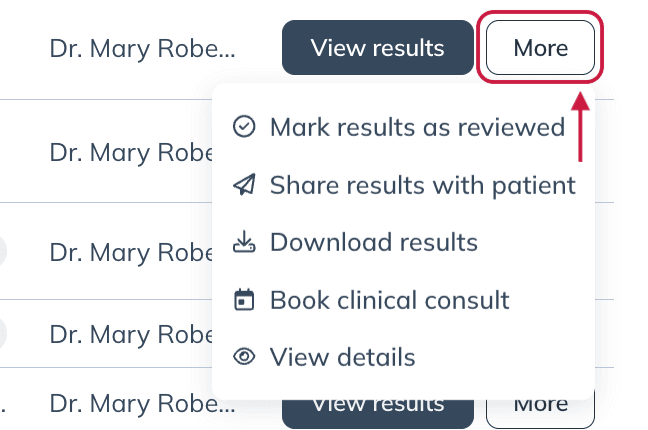
After results have been shared, Share results with patient changes to Re-share results with patient.
When you share results, your patient receives an email from Fullscript with a link to view their results in their account.
Patients have access to their testing results as soon as they become available. They won’t be notified by email until a provider or staff member completes the step of sharing the results from their account.
Clinical consultations
Our specialty lab partners offer clinical consultations to support providers in interpreting their patients’ lab results. These one-on-one consultations are designed to provide educational support and clinical guidance.
To learn how to schedule a clinical consultation and explore the available scheduling options, see Clinical consultations.