
Staff members can help their team manage lab testing workflows in Fullscript—from adding lab tests to plans to tracking results. Once a provider is registered for labs, staff can create plans with testing on their behalf.
To add staff to your account to help with labs ordering and management, see Adding practitioners and staff members.
Staff can’t register providers for labs, but can support nearly every other step.
Labs registration
Before staff can include lab tests in plans, the assigned provider must complete labs registration.
- This applies to both licensed providers and those using the authorization network.
- If a provider hasn’t registered, staff will see a banner in the Labs catalog.
- Providers must register through their own account.
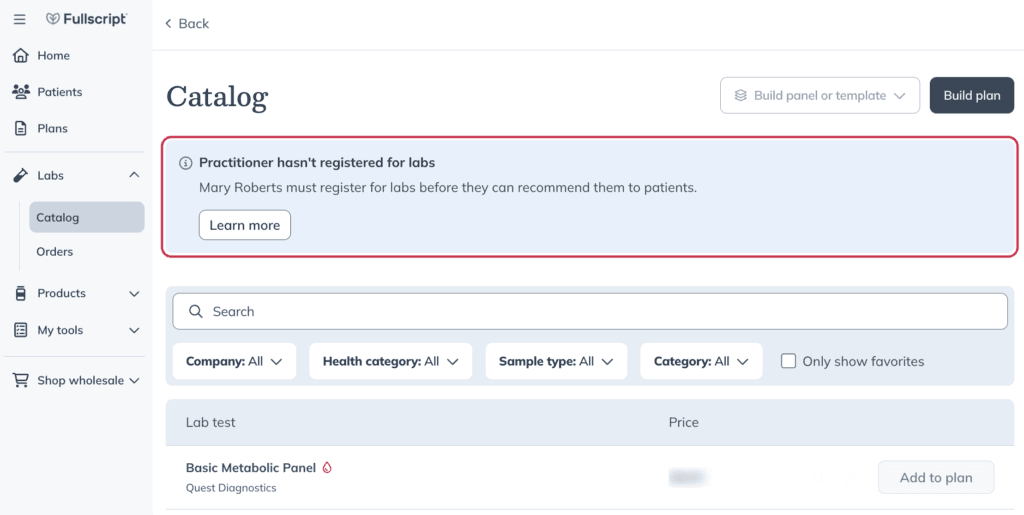
Labs catalog registration required banner.
Staff access to lab tools
Once a provider is registered, staff can also:
- Create and edit custom panels
- Track a patient’s testing status
- Upload and review external lab results.
- View and share patient test results
- Access the team’s lab orders dashboard
Adding labs to a plan
Clerk accounts can add lab tests to a plan on behalf of providers who have completed labs registration. When creating a lab plan, clerk accounts can select the ordering provider from a list of eligible providers on the account. Main practitioner and sub-practitioner accounts can't select another ordering provider; the order is placed under the practitioner who's logged in or the signing practitioner configured for the account.
If your practice uses a supported electronic health record (EHR) or another activated Fullscript integration, lab plans can also be created from your integrated system instead of directly in Fullscript.
Regardless of whether a lab plan is created in Fullscript or through an activated integration:
- Patients complete the same Fullscript checkout experience.
- Patient billing and payment are handled through Fullscript.
- Lab fulfillment and results follow the standard Fullscript workflow.
With an activated integration, the order originates in your connected system and is sent to Fullscript automatically.
Labs created through an integration are available for patient-pay orders only. The assigned provider must have an active Fullscript account with an activated integration and completed labs registration.