
Log in to your account!
Select a page from the list below to learn how to use and navigate the platform:
Fullscript may also include tools that help you and your provider track your health over time, such as wellness check-ins, lab uploads, or connected health data.
Video: Getting started with Fullscript
Personalized plans
Protocols: General wellness support
Catalog: Explore products
Save for later: Favorites
Use Save for later (Favorites) to keep track of products you’d like to purchase in the future. While browsing the catalog, select the heart icon (♡) on a product to save it. You can access your saved products anytime by selecting the heart icon in the top navigation.
Auto refill: Schedule automated orders
Order history: Past orders, receipts, and tracking details
Your shopping cart: Review items and check out
My account: Manage your account details
iOS app: Fullscript notifications
In the Fullscript mobile app, you’ll find a Bell icon ( ) in the upper right-hand corner of most pages.
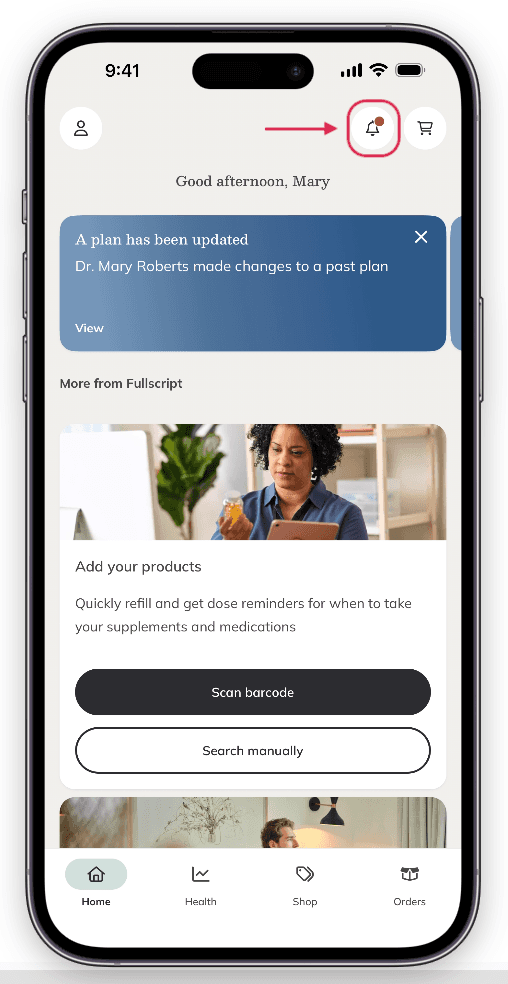
The Notification bell.
Tap the bell ( ) to view your recent notifications from the Fullscript app. A red dot will appear when you have new notifications. Notifications can be related to:
- New plans: When your practitioner has sent you a new plan.
- Plan updates: Your practitioner has made a change to one of your existing plans.
- Refill reminders: It’s time to reorder so you don’t run out!
Dark mode
Browsing at night? Dark mode is available in the Fullscript mobile app. Tap the icon button in the top left corner of the screen, then select Appearance. In the new screen, select whether you'd like to use your device settings, Light mode, or Dark mode.
Dark mode isn't available when browsing Fullscript in a web browser.
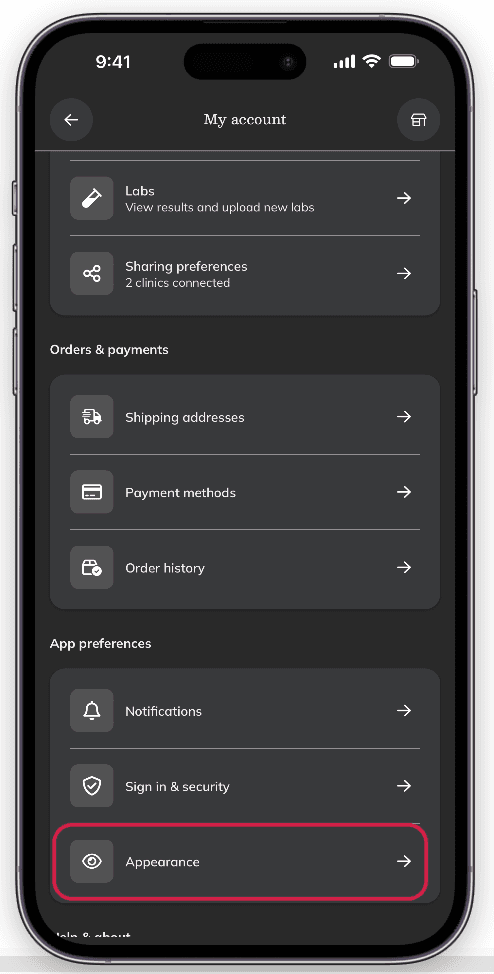
Selecting Appearance from the menu on the iOS app.
Signing out: Ending your session
Still need help?
If you need help with your Fullscript account or an order (like signing in, updating your email, tracking a package, or returns), contact Fullscript Support. For questions about a plan, product, lab, or your health, please contact your practitioner directly using the contact details on their website.