
Fullscript Support

Last modified: July 09, 2026

Navigating your patient account

block patient large grey-700

heading link text Log in normal ltr custom text to your account! normal ltr h3

paragraph text Select a page from the list below to learn how to use and navigate the platform: normal ltr

list listitem link text Plans normal ltr custom ltr listitem link text Protocols normal ltr custom ltr listitem link text Catalog normal ltr custom text (if available) normal ltr listitem link text Save for later (Favorites) normal ltr custom ltr listitem link text Auto refill normal ltr custom ltr listitem link text Order history normal ltr custom ltr listitem link text My account normal ltr custom ltr ltr bullet ul

paragraph text Fullscript may also include tools that help you and your provider track your health over time, such as normal link text wellness check-ins normal ltr custom text , normal link text lab uploads normal ltr custom text , or normal link text connected health data normal ltr custom text . normal ltr

heading text Video: Getting started with Fullscript normal ltr h2

block 16:9

heading text Personalized plans normal ltr h2

block iOS app/Android app root paragraph text Plans are sorted by date, with the most recent displayed first. Click normal text New plans normal text on the normal text Home normal text page in the mobile app to see your plans. normal ltr upload media paragraph text Click normal text New Plans normal text to view your wellness plans. normal ltr paragraph text normal ltr block tip root paragraph text Tap on a plan and select normal text Add all to cart normal text to add all products from a plan to your shopping cart, or tap on a product and tap normal text Add to cart normal text to add individual products. normal ltr ltr ltr Desktop root paragraph text Personalized supplement plans created by your healthcare provider are displayed in the normal text Plans normal text tab of the normal text My health normal text page. normal ltr paragraph text Plans are sorted by date, with the most recent displayed first. Scroll down the page to see the rest of your plans. normal ltr paragraph text [IMAGE FAILED TO UPLOAD: https://support.fullscript.com/wp-content/uploads/2024/04/DT-PT-Myhealthupdatewithfav.png] normal ltr paragraph text Viewing the My health page. normal ltr block tip root paragraph text Select normal text Review full plan normal text to begin adding the products in a specific plan to your cart. See normal link text Placing an order normal ltr custom text to learn more. normal ltr ltr ltr Mobile browser root paragraph text Personalized supplement plans created by your healthcare provider are displayed in the normal text Plans normal text tab of the normal text My health normal text screen. normal ltr paragraph text Plans are sorted by date, with the most recent displayed first. Scroll down the screen to see the rest of your plans. normal ltr upload media paragraph text Viewing your personalized plans. normal ltr block tip root paragraph text Select normal text Review full plan normal text to begin adding the products in a specific plan to your cart. See normal link text Placing an order normal ltr custom text to learn more. normal ltr ltr ltr

heading text Protocols: General wellness support normal ltr h2

block iOS app/Android app root paragraph link text Protocols normal ltr custom text are a type of supplement plan that your practitioner can share with you or any number of their patients to guide you on your path to wellness! Click normal text Protocols normal text to see the plans your practitioner has shared with you. These plans include bundled specific products, recommended quantities, supporting documents, and dosage instructions targeting a condition or wellness goal. normal ltr paragraph text To view protocols in the app: normal ltr list listitem text From the bottom menu, tap normal text Shop normal text . normal ltr listitem text Scroll down to the normal text Protocols normal text section. normal text Finding Protocols in the mobile app. normal ltr ltr number ol ltr Desktop root paragraph link text Protocols normal ltr custom text are a type of supplement plan that your practitioner can share with you or any number of their patients to guide you on your path to wellness! Click normal text Protocols normal text to see the plans your practitioner has shared with you. These plans include bundled specific products, recommended quantities, supporting documents, and dosage instructions targeting a condition or wellness goal. normal ltr paragraph text Select a plan to learn more. You can order all or select products from these plans, but we recommend speaking with your practitioner if you have questions or concerns about whether a shared plan is right for you. normal ltr ltr Mobile browser root paragraph text Community plans normal text are a type of supplement plan that your practitioner can share with you or any number of their patients to guide you on your path to wellness! Tap normal text Community plans normal text to see the plans your practitioner has shared with you. These plans include bundled specific products, recommended quantities, supporting documents, and dosage instructions targeting a condition or wellness goal. normal ltr paragraph text Tap on a plan to learn more. You can order all or select products from these plans, but we recommend speaking with your practitioner if you have questions or concerns about whether a shared plan is right for you. normal ltr upload media paragraph text Browsing your practitioner’s Community plans. normal ltr ltr

heading text Catalog: Explore products normal ltr h2

block iOS app/Android app root paragraph text Access to the normal link text Catalog normal ltr custom text is determined by your practitioner and is not available in all dispensaries. If you don’t have access, speak to your practitioner to request a plan. normal ltr paragraph text Browse thousands of professional-grade supplements available through the Fullscript catalog. Search by product name, brand name, or use ingredient filters to find products without requiring a supplement plan. normal ltr block tip root paragraph text See normal link text searching the patient catalog normal ltr custom text to learn more! normal ltr ltr ltr Desktop root paragraph text Access to the normal text Catalog normal text is determined by your practitioner and isn’t available in all dispensaries. If you don’t have catalog access, speak to your practitioner to request a plan. normal ltr paragraph text Browse thousands of professional-grade supplements available through the Fullscript catalog. Search by product name, brand name, or use ingredient filters to find products without requiring a supplement plan. normal ltr paragraph text Select the heart icon (♡) on any product to save it to normal text Save for later normal text and come back to it later. normal ltr paragraph text normal ltr paragraph text [IMAGE FAILED TO UPLOAD: https://support.fullscript.com/wp-content/uploads/2024/04/Screenshot-2026-07-06-at-10.01.16 AM.png] normal ltr paragraph text Exploring products in the search field. normal ltr block tip root paragraph text See normal link text searching the patient catalog normal ltr custom text to learn more! normal ltr ltr ltr Mobile browser root paragraph text Access to the normal text Catalog normal text is determined by your practitioner and isn’t available in all dispensaries. If you don’t have catalog access, speak to your practitioner to request a plan. normal ltr paragraph text Browse thousands of professional-grade supplements available through the Fullscript catalog. Search by product name, brand name, or use ingredient filters to find products without requiring a supplement plan. normal ltr paragraph text As you type in the search field, hit enter/return on your keyboard to submit and search for related products. Or, select a suggested filter to view specific results. For example, searching normal text Probiotic Blend normal text applies an ingredient filter normal text and returns all products that contain a probiotic ingredient type (shown in the image below). normal ltr upload media paragraph text Exploring products using an ingredient filter. normal ltr block tip root paragraph text See normal link text searching the patient catalog normal ltr custom text to learn more! normal ltr ltr ltr

heading text Save for later: Favorites normal ltr h2

paragraph text Use normal link text Save for later (Favorites) normal ltr custom text to keep track of products you’d like to purchase in the future. While browsing the catalog, select the heart icon (♡) on a product to save it. You can access your saved products anytime by selecting the heart icon in the top navigation. normal ltr

heading text Auto refill: Schedule automated orders normal ltr h2

block iOS app/Android app root paragraph text Sign up for auto refill and get products shipped directly to you on a predetermined schedule. See normal link text auto refill with Fullscript normal ltr custom text to learn more! normal ltr upload media paragraph text Schedule auto refills of your go-to products from the normal text Orders normal text page in the mobile app. normal ltr paragraph text normal ltr ltr Desktop root paragraph text Sign up for auto refill and get products shipped directly to you on a predetermined schedule. See normal link text Auto refill with Fullscript normal ltr custom text to learn more! normal ltr upload media paragraph text Schedule and manage automatic shipments of your go-to products from the auto refill page. normal ltr ltr Mobile browser root paragraph text Sign up for auto refill and get products shipped directly to you on a predetermined schedule. See normal link text auto refill with Fullscript normal ltr custom text to learn more! normal ltr upload media paragraph text Schedule and manage automatic shipments of your go-to products from the auto refill screen. normal ltr ltr

heading text Order history: Past orders, receipts, and tracking details normal ltr h2

block iOS app/Android app root heading text Order history normal ltr h3 paragraph text Access your order history by tapping the icon at the top left-hand corner in mobile app, then tapping normal text Order history normal text . normal ltr upload media paragraph text Tap normal text Order history normal text to view your orders. normal ltr heading text Downloading receipts normal ltr h3 paragraph text Once placed successfully, you can find your orders and receipts (invoices) here too. To view a receipt, tap on an order and then tap normal text PDF receipt normal text . normal ltr upload media paragraph text Tap normal text PDF receipt normal text from a past order to view a receipt. normal ltr heading text Track a shipment normal ltr h3 paragraph text To track a shipment, find the order number in your order history and tap on it. Then tap normal text Track package normal text . normal ltr ltr Desktop root paragraph text Select normal text Order history normal text from the patient menu to view past orders and normal link text receipts normal ltr custom text . Orders that have been placed successfully can be found here after they’ve been placed. normal ltr paragraph text normal ltr heading text Track a shipment normal ltr h3 paragraph text To track a shipped order, find the order number in your order history, then click normal text Track package normal text . See normal link text Tracking your order normal ltr custom text for more information. normal ltr upload media paragraph text The Track Package button to the right of the order number. normal ltr paragraph text normal ltr heading text Downloading receipts normal ltr h3 paragraph text To download a receipt, select the order in your order history, click the normal text More options normal text ( normal inlineBlock fontawesome far ellipsis-vertical text ) then click normal text Products normal text normal text PDF receipt normal text to start the download. normal ltr upload media paragraph text Downloading a pdf receipt. normal ltr ltr Mobile browser root paragraph text Tap normal text Order history normal text from the patient menu to view past orders and normal link text receipts normal ltr custom text . Orders that have been placed successfully can be found here after they’ve been placed. normal ltr paragraph text normal ltr heading text Track a shipment normal ltr h3 paragraph text To track a shipped order, find the order number in your order history, then tap normal text Track package normal text . See normal link text Tracking your order normal ltr custom text for more information. normal ltr upload media paragraph text Tap normal text Track package normal text to track an order. normal ltr ltr

heading text Your shopping cart: Review items and check out normal ltr h2

block iOS app/Android app root paragraph text Tap the cart icon ( normal inlineBlock fontawesome far cart-shopping text ) to view products in your cart in the mobile app. Review your order, then tap normal text Checkout normal text to place your order. See normal link text Managing your shopping cart normal ltr custom text to learn more about interacting with your cart. normal ltr upload media paragraph text The in-app cart. normal ltr paragraph text normal ltr ltr Desktop root paragraph text Select the cart icon ( normal inlineBlock fontawesome far cart-shopping text ) to view products in your cart. Review your order, then normal text Continue to checkout normal text to place your order. See normal link text Managing your shopping cart normal ltr custom text to learn more about interacting with your cart. normal ltr paragraph text Not ready to purchase a product? Select the heart icon (♡) while browsing to save it to normal text Save for Later normal text instead of adding it to your cart. normal ltr upload media paragraph text Navigating to the cart and removing an item. normal ltr ltr Mobile browser root paragraph text Tap the cart icon ( normal inlineBlock fontawesome far cart-shopping text ) to view products in your cart. Review your order, then tap normal text Checkout normal text to place your order. See normal link text Managing your shopping cart normal ltr custom text to learn more about interacting with your cart. normal ltr upload media paragraph text Tap normal text Checkout normal text to place an order. normal ltr ltr

heading text My account: Manage your account details normal ltr h2

block iOS app/Android app root paragraph text View and manage your account details, including your account security, push notifications, and email address by tapping the icon in the top left corner of the mobile app. normal ltr upload media paragraph text Accessing My account from the iOS app. normal ltr block note root paragraph text Saved payment methods can also be managed by logging into your Fullscript account from a browser. normal ltr ltr paragraph text normal ltr heading text Switch dispensary normal ltr h3 paragraph text Patients belonging to multiple Fullscript dispensaries will see an option to switch between accounts sharing the same login email with their account settings. normal link text Switch between accounts normal ltr custom text by tapping normal text Switch dispensary normal text in the account menu, then select the dispensary name you’d like to order from. normal ltr ltr Desktop root paragraph text View and manage your account details, including your password and saved payment methods, from the normal text My account normal text page. normal ltr upload media paragraph text Going to the My account page. normal ltr paragraph text normal ltr heading text Switch dispensary normal ltr h3 paragraph text Patients belonging to multiple Fullscript dispensaries will see an option to switch between accounts sharing the same login email. normal link text Switch between accounts normal ltr custom text by selecting normal text Switch dispensary normal text , then select the dispensary name you’d like to order from. normal ltr upload media paragraph text Selecting Switch dispensary to switch between accounts. normal ltr ltr Mobile browser root paragraph text View and manage your account details, including your password and saved payment methods, from your normal text Account normal text screen. normal ltr upload media paragraph text View account information from your normal text Account normal text page. normal ltr paragraph text normal ltr heading text Switch account normal ltr h3 paragraph text Patients belonging to multiple Fullscript dispensaries will see an option to switch between accounts sharing the same login email. normal link text Switch between accounts normal ltr custom text by tapping normal text Switch account normal text , then select the dispensary name you’d like to order from. normal ltr upload media paragraph text Tap normal text Switch account normal text to view another account. normal ltr ltr

heading text iOS app: Fullscript notifications normal ltr h2

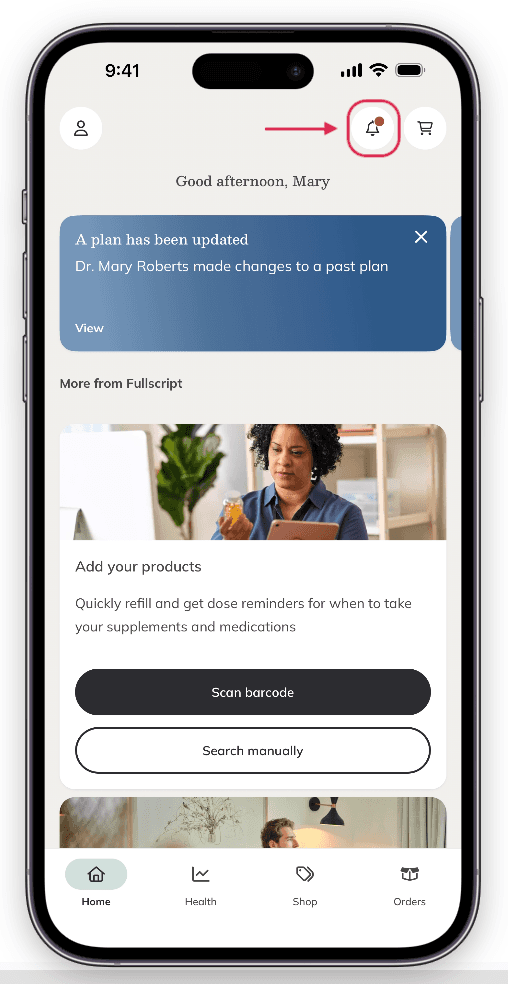
paragraph text In the Fullscript mobile app, you’ll find a normal text Bell icon normal text ( normal inlineBlock fontawesome far bell text ) in the upper right-hand corner of most pages. normal ltr
upload media

paragraph text The normal text Notification bell normal text . normal ltr

paragraph text Tap the bell ( normal inlineBlock fontawesome far bell text ) to view your recent notifications from the Fullscript app. A red dot will appear when you have new notifications. Notifications can be related to: normal ltr

list listitem text New plans normal text : When your practitioner has sent you a new plan. normal ltr listitem text Plan updates normal text : Your practitioner has made a change to one of your existing plans. normal ltr listitem text Refill reminders normal text : It’s time to reorder so you don’t run out! normal ltr ltr bullet ul

heading text Dark mode normal ltr h2

block iOS app/Android app root paragraph text Browsing at night? Tap the icon button in the top left corner of the screen on the mobile app, then select normal text Appearance. normal text In the new screen, select whether you’d like to use your device settings, Light mode, or Dark mode. normal ltr upload media paragraph text Selecting normal text Appearance normal text from the menu on the iOS app. normal ltr ltr Desktop root paragraph text Browsing at night? Select your name from the patient menu, and select the toggle at the bottom to activate (or deactivate) dark mode. normal ltr upload media paragraph text Select normal text Dark Mode normal text to toggle between light and dark mode. normal ltr ltr Mobile browser root paragraph text Browsing at night? Tap the patient menu ( normal inlineBlock fontawesome far bars text ), your name and then select the normal text Dark mode normal text toggle to activate (or deactivate) dark mode. normal ltr upload media paragraph text Select Dark Mode to toggle between light and dark mode. normal ltr ltr

heading text Signing out: Ending your session normal ltr h2

block iOS app/Android app root paragraph text Ready to sign out? Tap the menu button in the top right, then tap normal text Sign out normal text to end your session on the mobile app. normal ltr ltr Desktop root paragraph text Ready to sign out? Select your name from the patient menu, then normal text Sign out normal text to end your session. normal ltr upload media paragraph text Select normal text Sign out normal text to log out of your account. normal ltr ltr Mobile browser root paragraph text Ready to sign out? Tap the patient menu ( normal inlineBlock fontawesome far bars text ), your name and then tap normal text Sign out normal text to end your session. normal ltr upload media paragraph text Tap normal text Sign out normal text to log out of your account. normal ltr ltr

heading text Still need help? normal ltr h2

paragraph text If you need help with your Fullscript account or an order (like signing in, updating your email, tracking a package, or returns), contact normal link text Fullscript Support normal ltr custom text . For questions about a plan, product, lab, or your health, please contact your practitioner directly using the contact details on their website. normal text normal ltr

Related articles