
Fullscript Assist is an AI-powered, HIPAA-compliant chat tool for providers built into Fullscript.
Assist helps reduce the manual work involved in building trusted, personalized care plans by combining clinical evidence, patient context, provider preferences, and Fullscript catalog data. It helps providers spend less time researching and assembling recommendations so they can focus more on patient care and clinical decision-making.
Unlike generic AI tools, Fullscript Assist is grounded in integrative and functional medicine principles and can be tailored to your clinical preferences, helping recommendations better reflect how you practice.
Accessing Fullscript Assist
You can open Fullscript Assist from the top-right corner of all pages in the Fullscript platform.
Fullscript Assist works best when a patient is selected. Assist can use information from the patient’s Currently Taking list and an active plan to provide more relevant recommendations and insights.
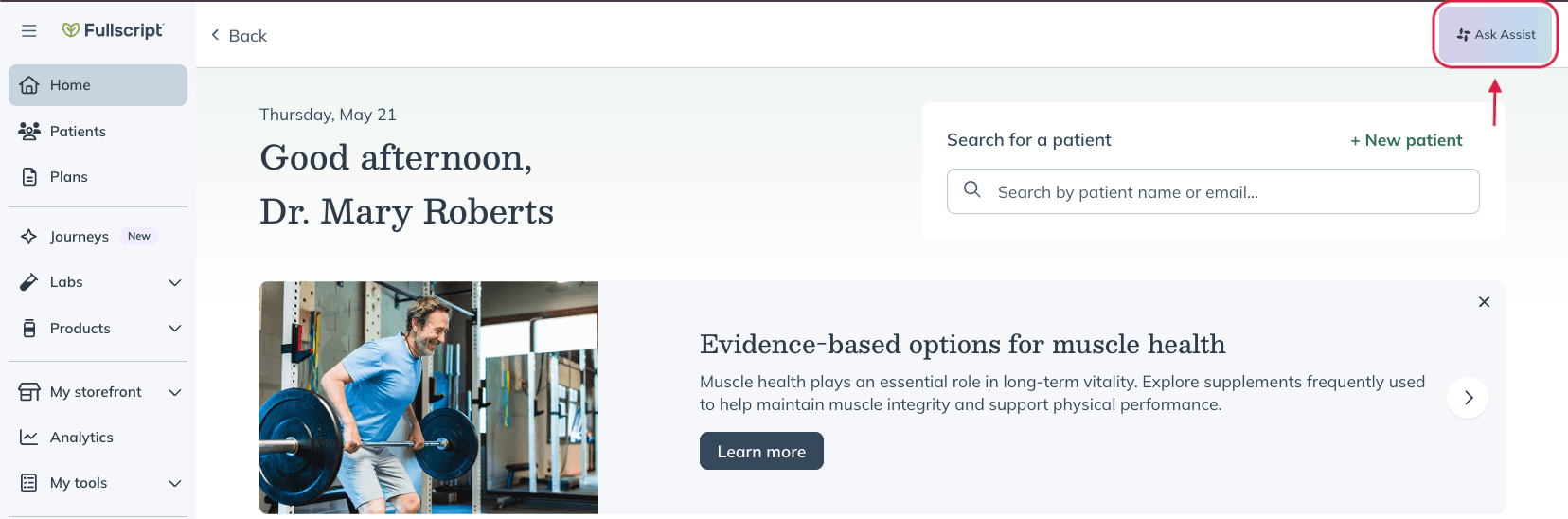
Accessing Fullscript Assist.
What can Fullscript Assist help with?
You can ask Assist questions using natural language, upload documents, or provide patient context to ssupport research, product selection, and care planning workflows.
The sections below highlight some of the ways Assist can support your workflow.
Build personalized care plans
Turn clinical notes into draft care plans more efficiently. Upload SOAP notes, visit summaries, lab reports, or other supporting documents, then ask Assist to help organize recommendations based on your clinical approach. Assist can also consider your product preferences and the patient’s existing supplement plan while generating suggestions.
Providers remain responsible for reviewing all recommendations before sharing them with patients.
Example prompt:
“Create a care plan for a patient with stress-related sleep disturbances and digestive complaints based on this SOAP note.”
Search and compare products
Ask Assist to recommend products based on ingredients, protocols, dietary preferences, allergens, dosage forms, or other criteria.
Assist searches the Fullscript catalog and provides recommendations that align with your request while allowing you to review alternatives before adding products to a supplement plan.
Example prompts:
“Find a magnesium glycinate that is third-party tested, free from common allergens, and appropriate for sleep support.”
“Find a professional-grade vitamin D3 liquid drop formulation that is combined with vitamin K2 (MK-7) and contains no artificial flavors.”
“Look for a multi-strain probiotic that contains at least 20 billion CFU, requires no refrigeration, is completely dairy-free, and uses delayed-release capsules.”
Review clinical evidence
Assist surfaces cited clinical evidence from trusted research platforms, including Examine.com and NatMed, to help you evaluate ingredients and care options.
Evidence is sourced from trusted research platforms, including Examine.com and NatMed.
Use Assist to:
- Evaluate care options
- Research ingredients
- Review supplement efficacy
- Explore lifestyle interventions
- Answer clinical questions
Example prompts:
“What is the consensus on using Ashwagandha (Withania somnifera) to modulate cortisol production and improve sleep latency in patients suffering from chronic burnout?”
“Is there strong clinical trial support for utilizing specific chelation forms of magnesium, such as glycinate versus threonate, to address sleep quality and anxiety?”
“Provide the clinical rationale and peer-reviewed guidelines for using coenzyme Q10 (specifically ubiquinol) to mitigate statin-induced myopathy and support mitochondrial ATP production.”
Interaction insights
Assist can help identify potential interactions between supplements, medications, and nutrients while you're building a care plan.
When a patient is selected, Assist can use information from the patient's Currently Taking list to surface relevant interaction insights alongside supporting clinical context. Drug-nutrient interaction and nutrient depletion information is provided through Fullscript's integrated NatMed data, helping you evaluate potential safety considerations while reviewing recommendations.
Nutrient depletion insights
Assist can highlight medications that are associated with nutrient depletion to help inform supplement recommendations.
These depletion insights are powered by Fullscript's integrated NatMed data. While Assist can use patient-specific medication information when a patient is selected, it can also surface general depletion risks without patient-specific data to support clinical research and care planning.
Biomarker and condition insights
Assist can help interpret available clinical information while supporting your care-planning workflow.
When lab results are available, Assist can highlight biomarkers, related clinical considerations, and suggest personalized lab panels and biomarker testing to support future care planning.
Personalized lab recommendations and biomarker testing suggestions are currently available to US providers only.
Personalize Assist to your practice
Customize Assist to match your clinical approach.
Providers can customize preferences such as:
- Supplement prescribing preferences
- Lifestyle recommendation approach
- Patient communication style
Assist can help generate a draft set of recommendations for provider review, including supplement options, lifestyle considerations, supporting evidence, and relevant products from the Fullscript catalog.
Example preferences:
Supplement prescribing preferences
“Avoid recommending gummy supplements for adults. For children, prioritize chewable formulations when appropriate.”
Lifestyle recommendation approach
“Be specific and actionable. ’30-minute walk after dinner, 5x per week’ — not ‘try to move more.’ My patients are type-A and need a protocol.”
Patient communication style
“Short. My patients don’t read long messages. I want bullet points with a one-line explanation for each.”
What Assist doesn’t do
Assist is designed to support provider decision-making — not replace it.
Assist:
- Doesn’t diagnose patients.
- Doesn’t make autonomous treatment decisions.
- Doesn’t place orders.
- Doesn’t communicate directly with patients.
- Doesn’t update patient records without provider approval.
Providers remain responsible for reviewing and approving all recommendations, plans, and communications.
Work more efficiently with Assist
Assist brings research, product discovery, evidence review, and plan-building workflows together in one place.
With Assist, you can:
- Build draft care plans from SOAP notes, clinical summaries, and other supporting documents.
- Search and compare supplements using natural language.
- Review cited clinical evidence, interaction insights, and nutrient depletion information.
- Explore biomarker insights and personalized lab recommendations.
- Personalize responses to match your clinical approach.