
Parents can now manage their dependent’s wellness plan through a connected Fullscript account. These accounts are called dependent accounts, and they allow you to view and manage plans, place orders, and stay involved in your dependent’s care—all from your own login.
Contact your provider if you need help setting up a dependent account. If your dependent already has a Fullscript account that’s not linked to your own, your provider can help create a new one and ensure everything’s set up correctly.
How dependent accounts work
Your dependent’s Fullscript account is linked to your email, so you’ll use your login to view and manage everything on their behalf. You’ll be able to:
- View their personalized plans.
- Place orders for your dependent.
- Set up scheduled auto-refills for products in their wellness plans.
- Track orders and view their order history.
- Manage your own account (if you have one) from the same login.
When you’re accessing a plan for your dependent via an email notification, you’ll only be able to purchase the products included in that plan.
Activating your dependent’s account
When a healthcare provider creates a dependent account for your dependent, you’ll receive an email from Fullscript asking you to confirm you’re their parent.
To activate the account:
- Open the activation email and follow the link.

- Review the statement and check the box to confirm your relationship.
- Click Ok to complete setup.
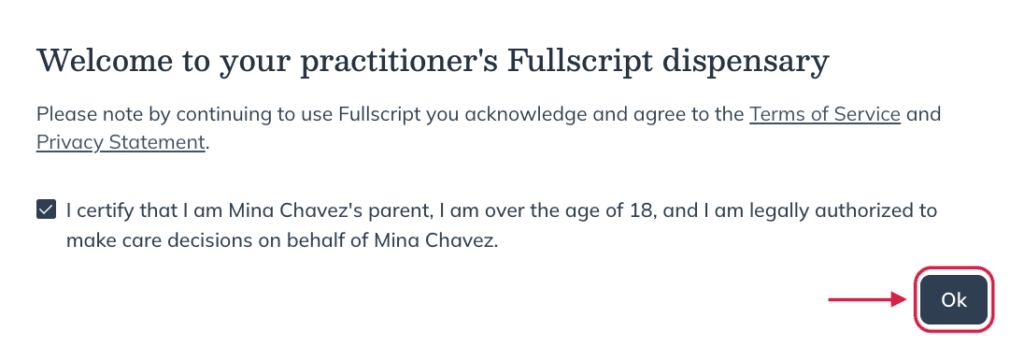
If you’re managing a dependent account that’s not connected to another Fullscript account, make sure to visit account settings to create a password and setup multi-factor authentication.
Once the account is active, you’ll be able to view and manage your dependent’s plan any time by logging into your Fullscript account.
You’ll need to activate your dependent’s account within 60 days. If it isn’t activated, it will be deleted automatically.
Managing multiple dependents
If you have more than one child, your provider can add each child as a new patient using the same email address you use for your Fullscript login. Each child will appear under your account after you accept their invite.
How it works:
- Your provider creates each child as a new patient and uses your email.
- You’ll get a separate email invitation for each child — open it and accept.
- Sign in with your email to toggle between profiles: your own and each child’s.
- View treatment plans and place orders from each child’s profile.
Switching between profiles
If you have your own Fullscript account as well, you can switch between your personal profile and your dependent’s from the same login. The process is the same as if you had multiple linked patient accounts.
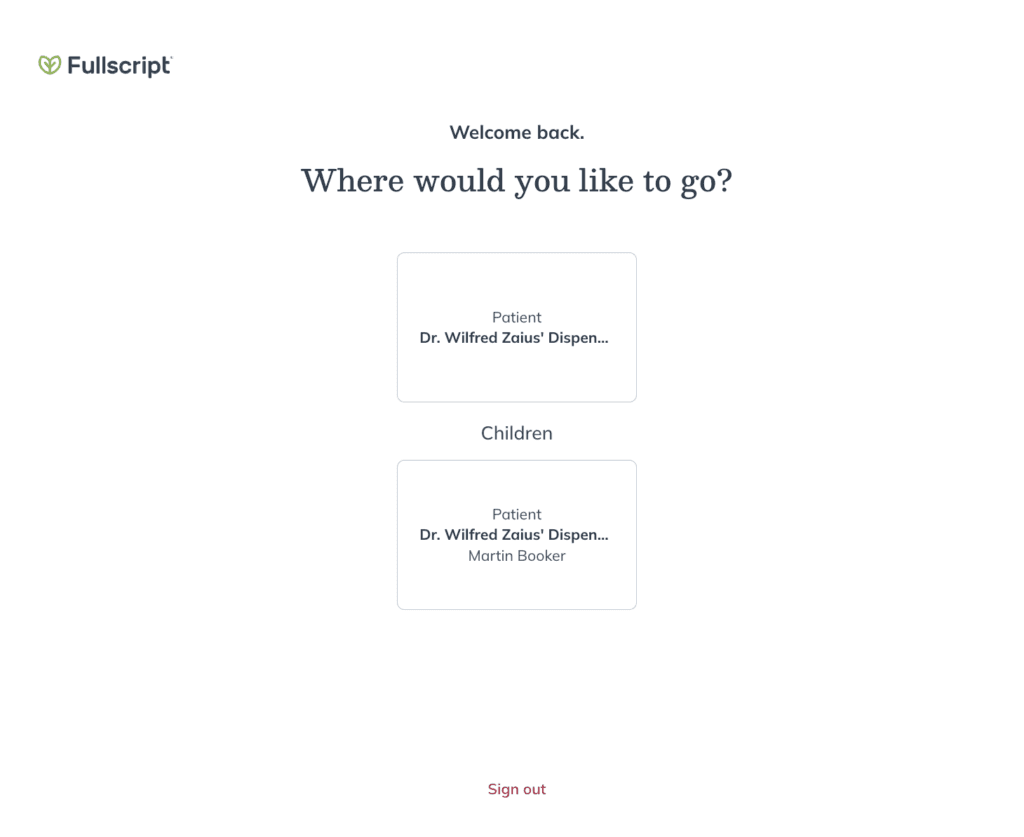
The account selection page featuring a primary account and a dependent account.
When your dependent turns 18
When your dependent turns 18, they’ll take over the management of their Fullscript account on their own. For privacy and legal reasons, you’ll lose access to their profile at that point.
When they reach their 18th birthday:
- You’ll be prompted to enter a new email address for your dependent.
- They’ll receive an invite to create their own login and password.
- Once they’ve activated their account, your access will be removed automatically.
Their plan and order history will be retained for continuity of care with their practitioner, but any saved payment methods will be removed.
Dormant dependent accounts
We automatically delete dependent accounts that remain inactive for 60 days after they’re created. This helps protect patient information and keeps our platform compliant with privacy and data-protection requirements.
What counts as inactive
An account is considered inactive when:
- No account activity occurs.
- No financial record is on file.
- The account contains only saved plans or test kits with no associated actions.
What to expect
- 7 days before deletion, we send an email to the parent on the account and to the practitioner who created the dependent.
- After deletion, the dependent’s personal data is removed from Fullscript.
- If an account includes financial records or orders, we retain the records we’re required to keep. The dependent account itself will no longer be available.