
Students working towards achieving a state or provincial-issued license at an accredited institution for an approved healthcare profession (see accepted fields of study below) can sign up with Fullscript and gain access to professional-grade products for themselves, friends, and family members.
Students get full access to Fullscript, with the exception of managing discounts and ordering labs. Use this time to explore the platform, learn wholesale, and get comfortable with virtual dispensing—so you’re ready to start as soon as you complete your program.
Student accounts are available to help students in their studies; they are not for active practice.
Differences between account types
Student accounts and dispensaries are different than other account types as they support learning while ensuring appropriate supervision. Each role has specific permissions within the platform.
Account type | What they’re for | Key limitations |
|---|---|---|
Student account | Access supplements for self, friends, and family members | • No access to labs ordering • Limited brand/product availability • No payouts, reselling, or business settings |
Practitioner | Create and share supplement and labs plans | • Responsible for all clinical decisions and oversight • Labs & product availability depend on credentials/licensing |
Patient | View recommendations and place orders | • Can’t create or edit plans • Can’t see other patients or clinic data • No access to practitioner tools or settings |
Student accounts vs student dispensaries
Student accounts and student dispensaries are designed for different use cases. Understanding how they work will help you choose the right setup for your program or role.
Student accounts (sub-practitioners)
Student accounts set up as sub-practitioners are designed for supervised clinical use.
With a student account, you can:
- Create and send supplement plans to patients
- Work within a supervising practitioner’s account
- Support patient care as part of your training
Access and permissions depend on how the supervising practitioner configures the account.
Student dispensaries
Student dispensaries are typically used in educational settings where students need access to products without managing patient care.
With a student dispensary, you can:
- Access and purchase supplements
- Learn how to navigate the platform
With a student dispensary, you can’t:
- Send supplement plans to patients
- Manage patient relationships or care
This setup is best for learning and product access only.
Key differences
Feature | Student account (sub-practitioner) | Student dispensary |
|---|---|---|
Send supplement plans | Yes | No |
Access patients | Yes | No |
Supervision required | Yes | No |
Primary use | Clinical training and patient care | Education and product access |
Approving your credentials and completing your account
To complete your account setup and begin purchasing products, we need to review proof of your enrollment to ensure you’re enrolled in an approved healthcare program. This should include your name, program of enrollment, as well as your school of enrollment.
Once approved, we’ll send you an email to let you know your account is order-ready. If your credentials aren’t approved and we need more information, one of our team members will reach out to you directly. Please allow 1 business day for your credentials to be reviewed.
We request your graduation date to remind you to provide your license/certificate upon completion of your program.
Accepted fields of study
Student ordering accounts are for students with credentials that prove enrollment at an accredited institution at an in-person program of more than one year in length, specializing in becoming any of the following:
- Acupuncturist
- Chiropractor
- Dentist
- Medical Doctor
- Naturopathic Doctor
- Nurse Practitioner
- Licensed Nutritionist
- Optometrist
- Osteopathic Physician
- Physician Assistant
- Registered Dietitian
- Registered Midwife
- Registered Nurse
- Pharmacist
- Practitioner of Oriental Medicine
Student accounts are for individuals heading toward licensure. Online courses leading to unlicensed designations may not be accepted. *Some exceptions may apply.
Personal & client ordering
You can place your first order once your student credentials are approved. Some brands will be unavailable until you complete your studies and we receive your additional credentials.
Personal ordering
Fullscript is available to students to aid their studies, not for active practice. Students can take advantage of virtual dispensing to place personal orders at a product’s retail price less a 25% (Canada) or 35% (US) student discount. Add yourself as a patient to place orders through a patient account or make use of in-office checkout.
Wholesale ordering
Students also have access to Fullscript wholesale but only for personal use. Wholesale is an inventory-stocking solution for in-office, on-site dispensing at a physical location with the purpose of resale. Per the agreements with our brand partners, students aren’t permitted to resell products. As such, all personal-use wholesale orders must be shipped to your home address to align with our wholesale shipping address requirements.
All orders will be reviewed by our in-house Compliance team and canceled if resale is suspected. Minimum advertised price (MAP) agreements must be accepted to order products at wholesale rates even though students can not resell products. You must adhere to these agreements upon graduation.
Not all brands are available to order wholesale but may be available through virtual dispensing at the retail price less your student discount.
Client ordering — friends and family
Students are permitted to add clients (friends and family) and send personalized recommendations. Friends and family can also order freely from the catalog, but won’t have access to your Favorites. In-office checkout is also available to place orders on behalf of friends and family.
Graduation
After you graduate, we’ll contact you to request a copy of your professional license or graduate certificate. You can also upload your documentation yourself from Account settings after graduation, and our team will follow up to review it. Once your documentation has been reviewed and approved, we’ll upgrade your account to practitioner status. This gives you access to features like profit margins, patient discounts, staff accounts, a customized supplement store for your patients, and more.
Samples of accepted student credentials
The following illustrative samples outline our requirements (student’s name, program of enrollment, and school of enrollment) for student-submitted credentials.
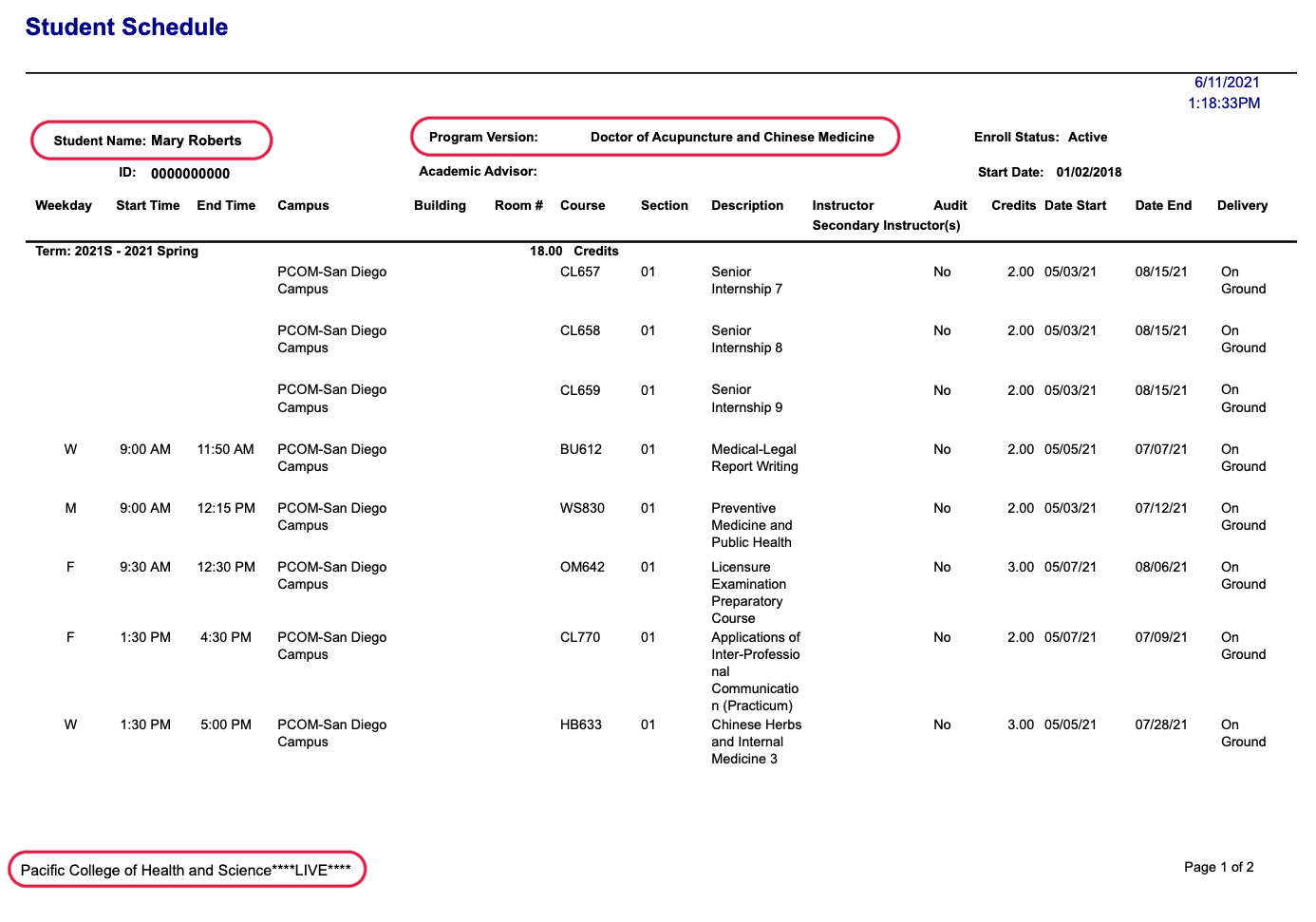
A copy of a student schedule that satisfies our student credential requirements.
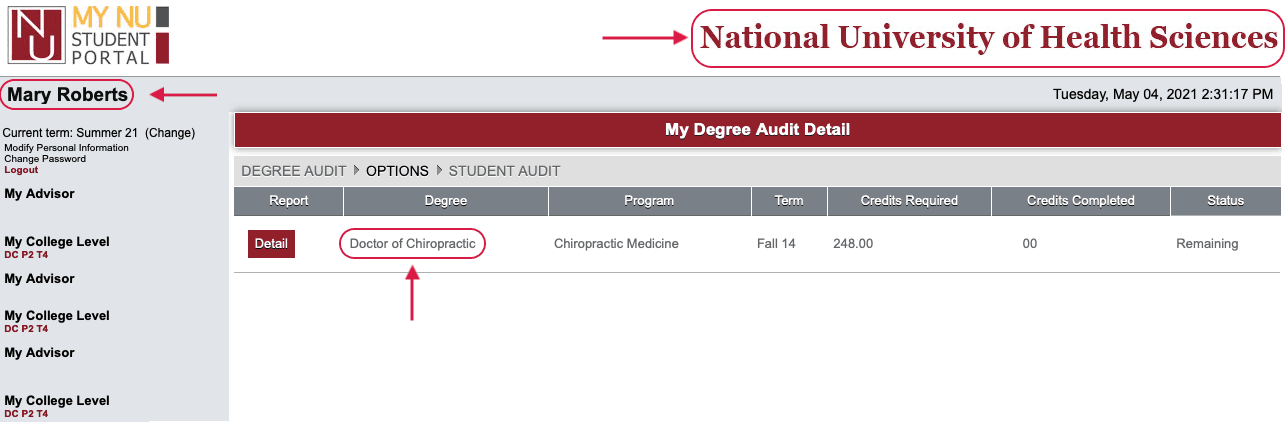
A screenshot from a student portal that satisfies our student credential requirements.