
Last modified: July 10, 2026
Labs billing and payment
Providers
Fullscript offers flexible billing options for labs, so you can choose the method that fits your practice’s workflow. You’re never locked into a single approach—select the payment method that works for each order.
Billing policies for supplements and lab services differ to align with healthcare standards. While supplements can be offered with a margin using a Fullscript profit account, this doesn’t apply to lab testing. With multiple options available, you can choose the payment setup that suits your practice.
Cash-pay billing options
All lab testing on Fullscript is cash-pay only and not eligible for insurance reimbursement, including direct billing and retroactive reimbursement through a Superbill.
Our cash-pay billing options include:
- Patient pay: Fullscript bills your patient for testing. They can pay through their Fullscript account, or you can complete the payment using in-office checkout.
- Practitioner pay: You pay upfront for testing and bill your patient separately. Test pricing is not disclosed to patients on the platform.
- Custom fees: Fullscript bills your patient for the cost of testing plus an itemized service fee you set. This fee is collected at checkout and paid out to your account.
Patient pay
Streamline your workflow with Patient pay, Fullscript’s default billing method. Patients can pay for testing through the same secure checkout they use for supplements.
To use Patient pay, review your plan, then either click Send to patient to send it immediately or schedule it to be sent on a future date.

You’ll see the same total price as your patient, including any applicable service fees like the Quest or Access Medical Labcorp Draw sample collection fees, the 3% specialty labs service fee, or authorization network fee.
When your patient receives a notification about your testing recommendation, they’ll check out directly from their Fullscript account. See the patient checkout experience for more.
In-office checkout
The in-office checkout tool lets practitioners and staff place orders on a patient’s behalf. This is especially useful for securing payment at the end of an appointment or assisting less tech-savvy patients through checkout.
If you’ve used in-office checkout for supplements, it works the same way for labs:
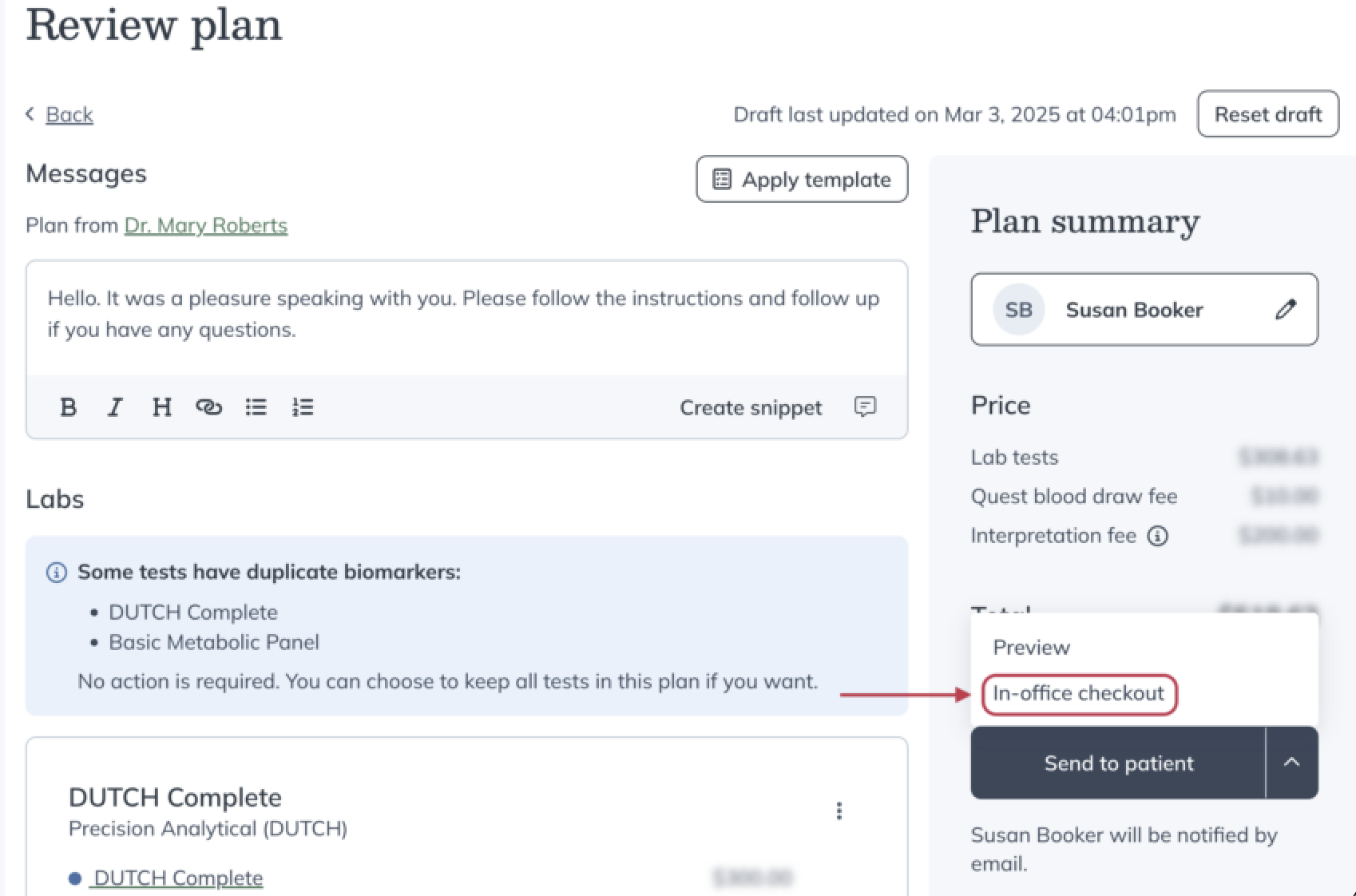
- In the Review plan stage, select In-office checkout from the dropdown under Send to patient.
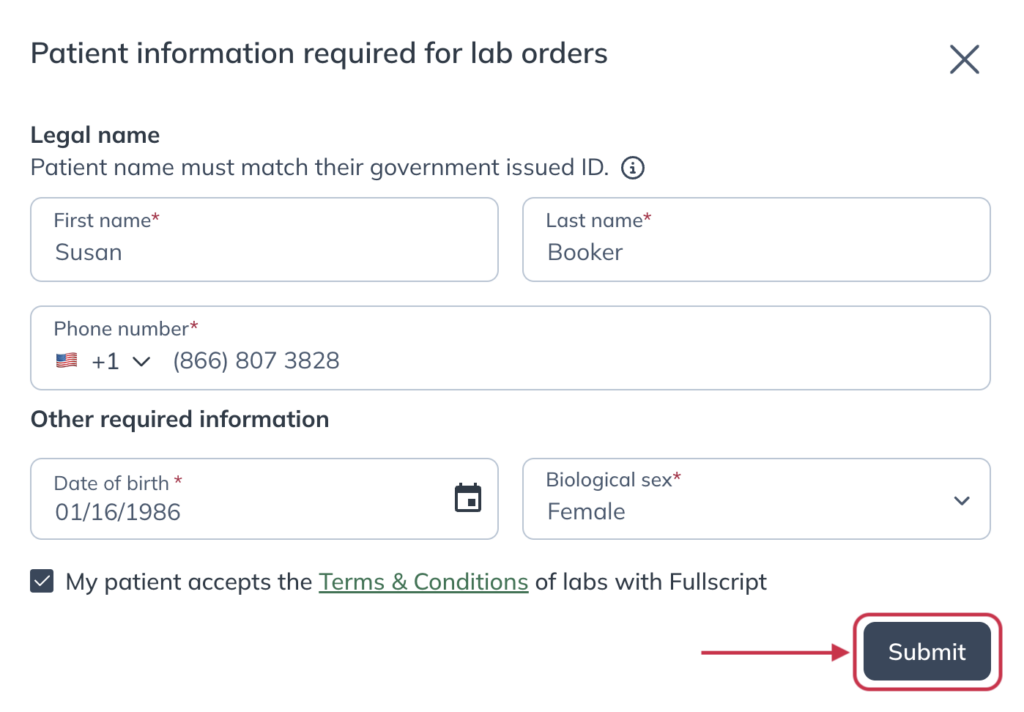
- Enter the patient’s legal first and last name, phone number, date of birth, and biological sex. Then, check the box confirming they’ve accepted the labs Terms and Conditions.
- Click Submit.
- After reviewing the order, click Continue to checkout.

- Provide the patient’s address, preferred shipping method (where applicable), and payment method. Then, click Place your order.
Once submitted, the patient will receive a confirmation email with a summary of their order and applicable charges.
Next steps depend on the type of test ordered—blood labs, specialty testing, or both.
Practitioner pay
Prefer to pay upfront and bill patients separately? Practitioner pay gives you full control over lab billing, with no test pricing disclosed on the platform. By paying for your patient’s order, they won’t see pricing information for the tests.
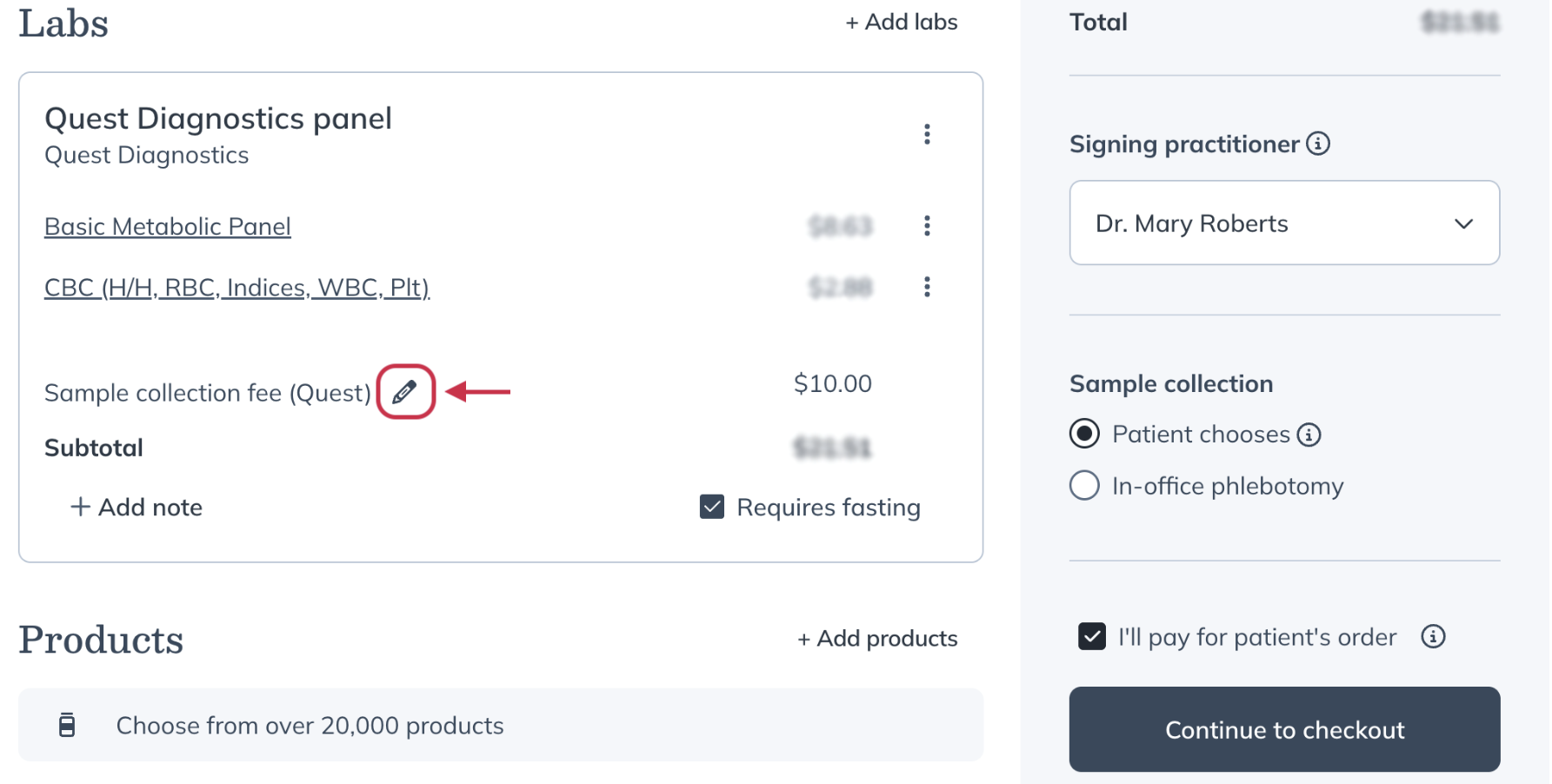
To pay for testing upfront, check I’ll pay for patient’s order on the Review plan page. This step can be completed by a practitioner or an invited staff member once a patient is selected for the plan. You can also schedule practitioner-pay lab plans for a future date.
If you’d like to choose the sample collection provider for your patient instead of having them choose during checkout, click the pencil icon next to Sample collection fee. You can view available collection options and fees before continuing.
If prompted, enter the patient’s legal first and last name, date of birth, phone number, and biological sex. You’ll also need to accept the lab terms of service on the patient’s behalf before clicking Submit.
Checking out labs with practitioner pay
To check out with Practitioner pay:
- Click Continue to checkout on the Review plan page.
- Provide the patient’s information, including their address.
- Click Continue.

- Enter your payment method and billing address.
- Click Place order or Place scheduled order, depending on whether you’re sending the plan immediately or scheduling it for later.
If you’re scheduling a practitioner-pay lab plan, you’ll enter your payment details when scheduling. Your payment method won’t be charged until the scheduled date.
After the order is submitted, your patient will receive an email with their lab order details and a link to view them in their Fullscript account.
You can download a receipt for your records immediately after placing the order by clicking Download labs receipt.
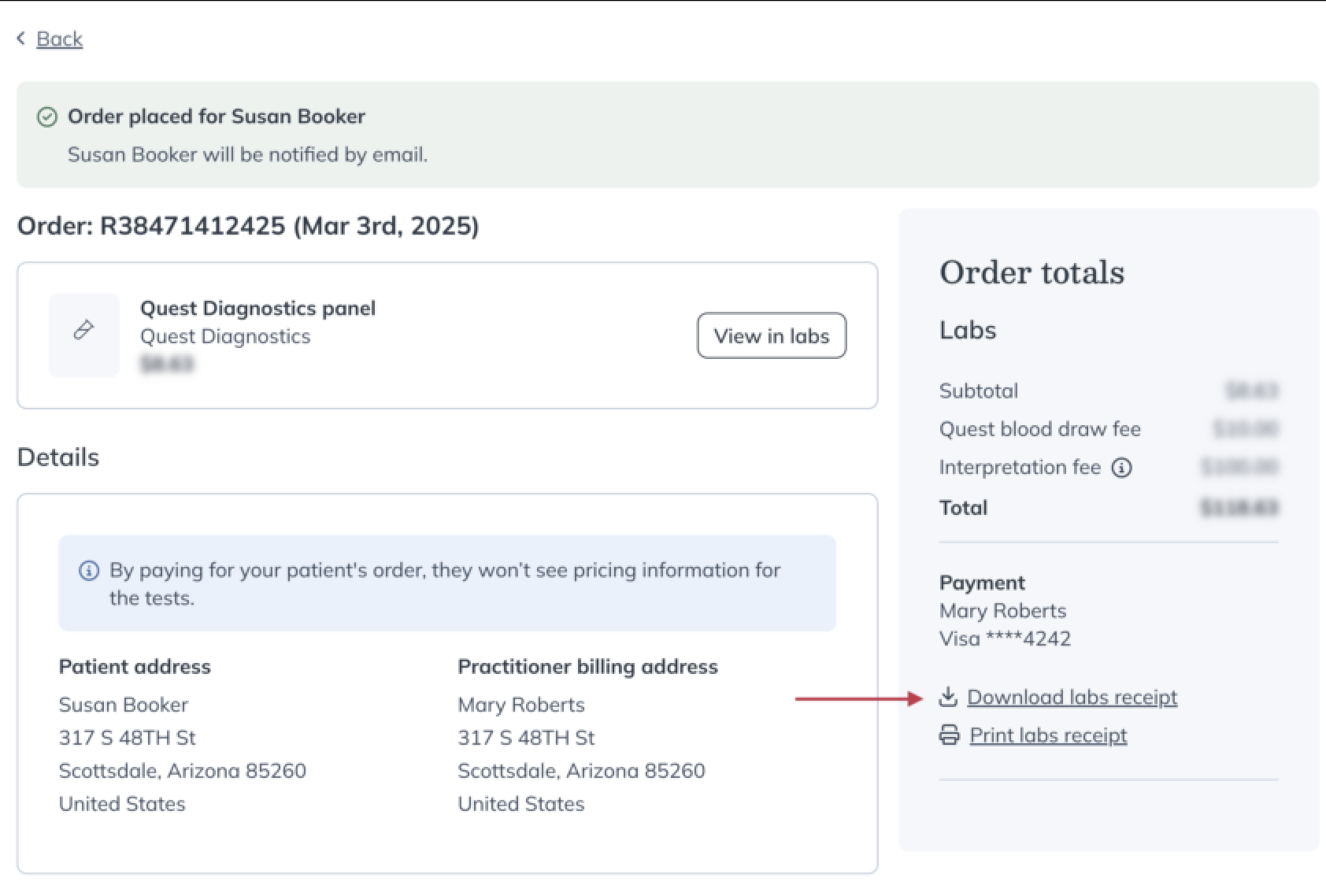
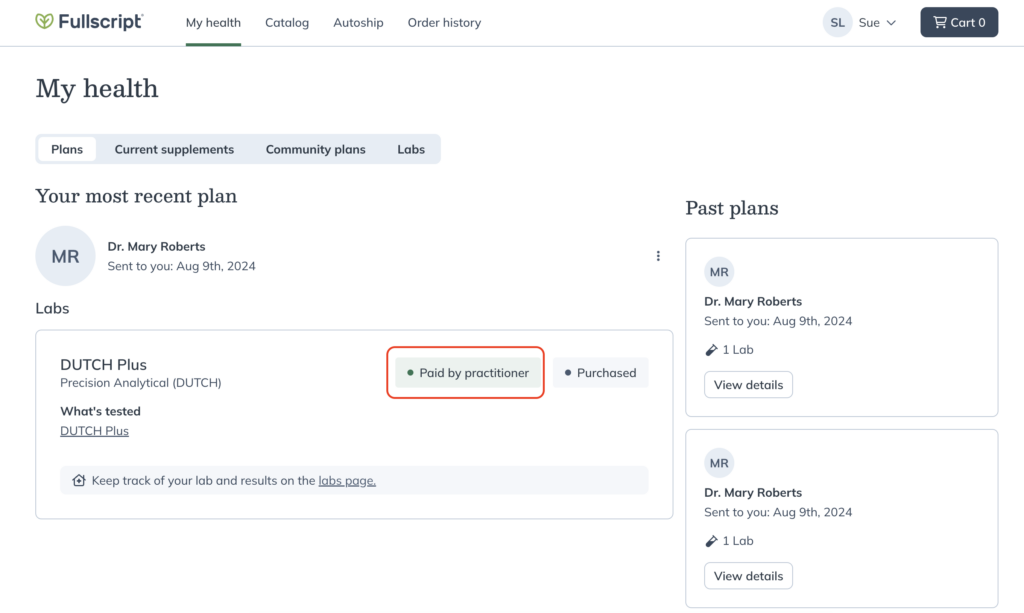
No matter which billing method you choose, patients receive the same support and guidance throughout their testing process. When you pay upfront, the only difference is that patients won’t see test pricing, allowing you to handle billing separately. Their order will be clearly marked as Paid by practitioner.
Custom fees
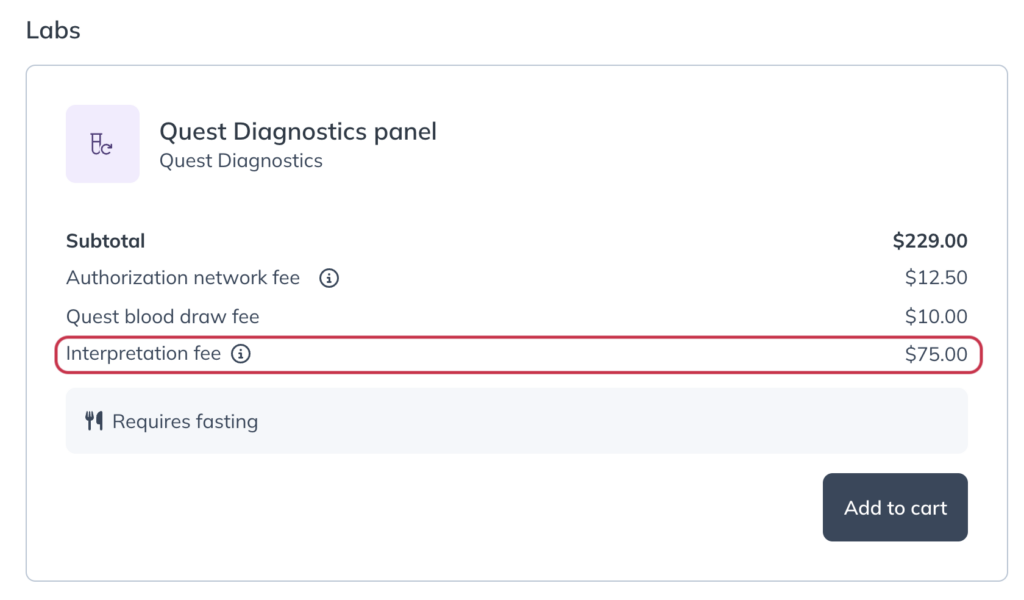
Custom fees help account for the time and services that often accompany lab testing. With Fullscript, you can add a custom, itemized fee to lab orders for additional services, such as test interpretation or consultations. Patients pay this fee along with the cost of the lab test at checkout.
Custom fees are set as a default for your account and staff, but you can edit or remove them for each lab recommendation.
Before you begin, make sure you have a bank account set up in your Fullscript profile. If this step isn’t complete, you’ll be prompted to do so when enabling custom fees.
For specialty labs, payouts are initiated when the kit ships. For phlebotomy labs, payouts begin when the requisition is generated. Custom fees appear as Custom fees in your payout report.
To enable custom fees:
- Click Labs in the left-hand navigation.
- Click Labs settings.
- Select Payment.
- Turn on the Enable custom fees toggle.
- Select a fee name from the dropdown list.
- Enter the default fee amount.
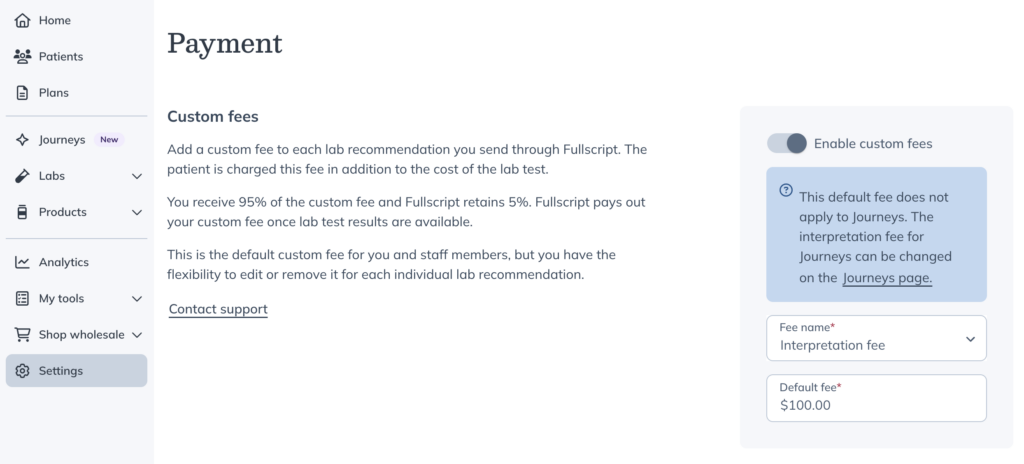
Once your custom fee is set up, it will automatically appear when any staff member or practitioner creates a plan that includes testing. Patients will see the fee as a separate line item at checkout.
Editing custom fees
To edit a custom lab fee, in the Review plan stage:
- Click Edit ( ) next to the custom fee.

- Update the fee name and/or amount in the Edit custom fee modal.
- Click Save to apply the changes.
Insurance
All lab testing on Fullscript is cash-pay only and not eligible for insurance reimbursement, including direct billing or retroactive reimbursement through a Superbill.
Fullscript doesn’t determine HSA/FSA eligibility for lab tests. Patients should check with their plan administrator to confirm HSA/FSA coverage.
Additional service fees
We offer competitive pricing for all lab tests in our catalog.
When applicable, transparent service fees will be clearly shown to both you and your patient.
- Quest draw fee – Patients pay a flat $10 at checkout for Quest testing, covering the full cost of phlebotomy at a Quest draw center.
- Authorization network fee – A $9.50 fee per test or blood panel covers the authorizing clinician’s review, test ordering, and result monitoring. If a critical result is found, it also includes patient notification.
- Custom fees – A custom, itemized fee to bill for additional services, such as test interpretation or consultations. Fullscript applies a 5% processing fee to cover costs.
- Labs service fee – A low 3% service fee on the price of specialty tests. This fee is not applied to blood labs.
Refunds and cancellations
Refunds for labs orders follow the terms laid out in the Labs refund policy. If you need to request a refund or cancellation on behalf of your patient, please contact our support team.
If you’re looking to cancel a labs order, you can:
- Remove the lab from the patient’s plan (prior to payment being processed)
- Cancel the plan altogether (prior to payment being processed)
- Contact our support team