
Whether patients are visiting you locally in your practice or working with you remotely, phlebotomy is a critical part of the lab testing process. Fullscript offers flexible options for completing blood draws through national lab partners, mobile phlebotomy services, and independent phlebotomy providers to support a smooth experience for both you and your patients.
This article provides an overview of the patient phlebotomy process based on the type of lab test ordered. For full walkthroughs of the patient’s full testing experience based on labs ordered:
Labs are available across all 50 states, but test availability can vary depending on where you and your patient are located. See Lab availability in New York, New Jersey, Rhode Island, and Hawaii for details and restrictions.
Patients in U.S. territories aren’t currently eligible.
The phlebotomy map
The phlebotomy map helps you find local blood draw options for your patients by searching by city, state, or zip code.
To access the map:
- In the left-hand navigation, select Labs.
- In the drop-down menu, select Phlebotomy map.
- Enter a location to view available options.
Results may include Quest Diagnostics and Labcorp locations, mobile phlebotomy services (such as Getlabs), and independent third-party draw sites.
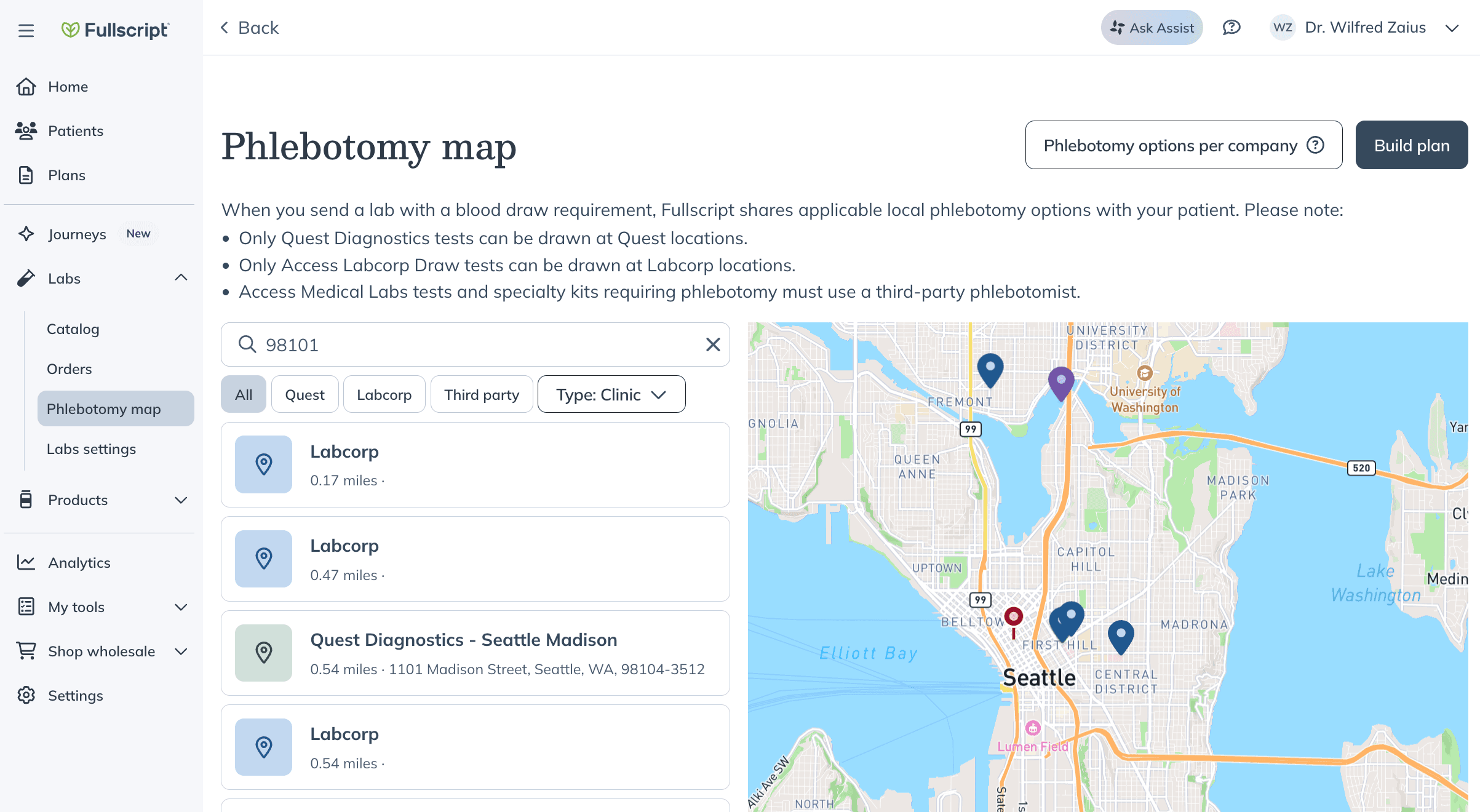
Search by location to view nearby phlebotomy options.
You can also:
- Select Phlebotomy options per company to view a summary of draw options by lab provider.
- Select Build plan to go to the lab catalog and begin creating a lab order.
Quest Diagnostics testing
Patients completing Quest Diagnostics testing through Fullscript can choose from the following sample collection options at checkout:
- Scheduling an appointment at a Quest Patient Service Center (PSC) – $10
- Scheduling at-home sample collection with Getlabs (mobile phlebotomy) – $95
After entering their zip code, patients will see options based on location and price and can select the most convenient option directly in their Fullscript account. Payment is completed during checkout, and no additional payment is required at the appointment.
Before creating a lab order, providers can check availability using the Quest PSC locator, Getlabs scheduling service map, or the phlebotomy map in their account.
For a step-by-step walkthrough of the patient experience, view the Quest Diagnostics experience guide.
Labcorp testing
Patients prescribed a Labcorp test can choose to have their blood drawn at a Labcorp Patient Service Center (PSC). This option appears automatically in checkout for eligible plans. After entering their zip code, patients will see available Labcorp locations based on their area and can schedule their appointment directly from their account.
Before creating a lab order, providers can use the Phlebotomy map in their account to explore available Labcorp locations. See the patient experience in Completing your Access lab test with Labcorp.
Preparing for an appointment
For Quest Diagnostics and Labcorp testing, patients can find everything they need to prepare by going to the My health page, selecting Labs, and clicking View details next to the relevant test. This gives them access to information such as:
Digital requisition form: Generated shortly after checkout and accessible in the patient’s account. Patients can print the form or show it on their mobile device at their appointment.
Preparation instructions: Includes details from the lab, such as fasting requirements.
Any custom notes: Custom notes or additional instructions from the provider. These are shown in the lab plan for additional guidance.
At the time of their appointment, patients will need:
- A form of ID
- Their requisition form (printed or digital)
Email reminders will be sent automatically with their appointment details and check-in steps.
Specialty lab testing
For specialty lab kits that require a blood draw, patients can complete collection through your practice or by booking with a phlebotomy provider after checkout.
When booking through Fullscript, patients enter their zip code during checkout to view available options in their area. These may include a configured preferred phlebotomist, Getlabs (mobile service), or other independent providers.
Phlebotomy services for specialty labs are provided by third parties and operate independently of Fullscript. Availability may vary based on location, staffing, and provider scope.
Quest and Labcorp don’t collect samples for specialty lab kits.
In-office phlebotomy: If you collect specialty lab samples in your own practice, patients can complete their blood draw during their visit. Specialty lab kits can also be ordered to stock in your office for same-day collection.
Preferred phlebotomists: If you’ve added a preferred phlebotomist in your settings, they appear as the default option when a patient selects a test. Patients receive contact details and instructions to schedule directly.Note: Fees are handled directly with the phlebotomist and aren’t included in patient checkout.
At-home collection with Getlabs: Patients can book an $95 mobile blood draw through Getlabs directly from their Fullscript account. Appointment availability is based on location.
Independent local phlebotomists: Patients can search by zip code to view and book available phlebotomy providers in their area. Options may include Getlabs, a configured preferred phlebotomist, or other third-party providers.Fees vary by provider and are paid directly to the phlebotomist.
Fees are paid directly to the phlebotomist and aren’t included in checkout. As a general reference:
- Walk-in lab collection: typically $25–50
- Mobile phlebotomy: typically $75–100+
If a patient can’t find a suitable phlebotomy option, they can contact our labs support team.