
Last modified: May 25, 2026
Tracking your wholesale order
Providers
Tracking information is accessible in your account and is also shared by email as orders leave our warehouse. For help with a lost or delayed shipment, please contact our Customer Support team.
Shipment confirmation emails with tracking details
As your order ships, you’ll receive an email with a tracking link so you can monitor your shipment(s). Notifications are sent to the email address listed in your login settings.
- To track your shipment, click Track package in the email. This will take you to the courier’s website (UPS, FedEx, USPS, or Canada Post), where you can view delivery updates and tracking history.
- To review your order, click View order details. This opens your order details page, where you can see which items have shipped—especially helpful if your order is arriving in multiple shipments.

If you run into any issues with your order, please contact us and our Customer Support team will be happy to help.
Access tracking information from wholesale order history
When your order has shipped, you can view the order in your account to retrieve your tracking information.
To view tracking history for a shipment:
- Click Shop wholesale in the navigation bar.
- Click Orders.
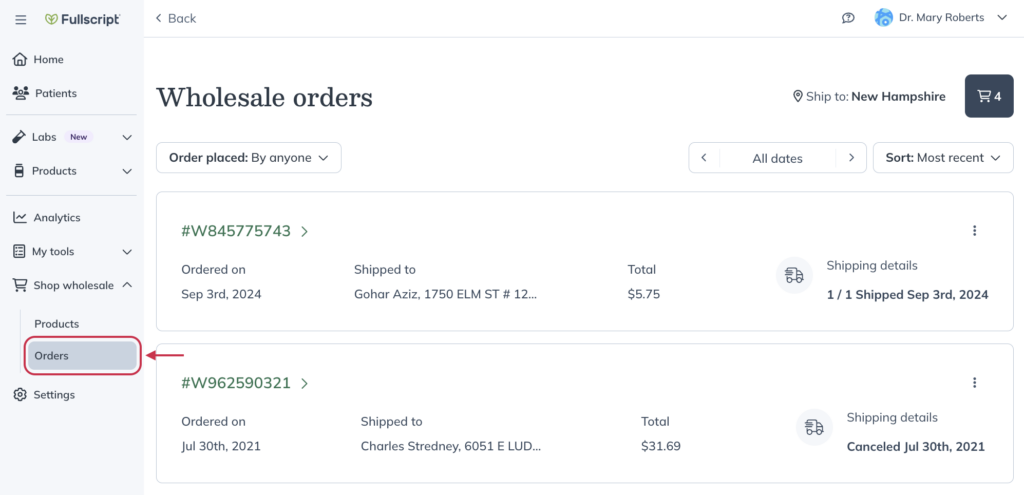
- Select the order you’d like to track.
- Click Track order and select the shipment you’d like to track.
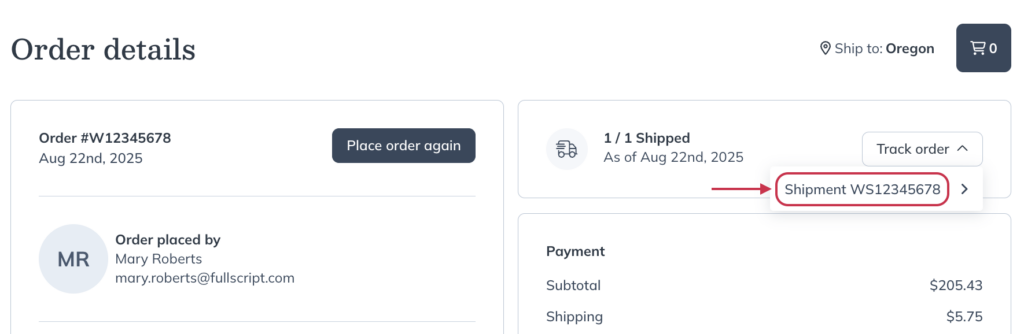
Partial shipments
Though we make every effort to ship orders in as few shipments as possible, your order may arrive in multiple packages. This can occur if all items in the order can’t be fulfilled by a single warehouse or if items were backordered (out of stock) at the time your order was processed.
Every time a package ships, we send a shipment notification email that includes a link to track the shipment on the courier’s website. These emails also communicate how many shipments we’re sending to fulfill your entire order.

Viewing items included in a shipment
View which items are included in a shipment by pulling up your order in your wholesale order history and filtering by shipment number.
To view items packed in each shipment:
- Click Shop wholesale in the navigation bar.
- Click Orders.
- Select an order to view the order details page.
- Click All Inventory and filter between shipments to see the items in each one.

Lost orders & shipping errors
If you have concerns surrounding the whereabouts of your order, make sure to check its status and tracking history on the courier’s website. You can also check its status and tracking information on your Wholesale orders page by selecting the order number.
If you find out that something has happened to your order, please contact our support team.