
Last modified: February 23, 2026
Similar products for practitioners
Providers
Fullscript’s Integrative Medical Advisory Team has curated similar products from the Fullscript catalog to help identify alternatives to the products you know and trust. These similar product suggestions are objectively selected based on ingredients, formulations, delivery form, and dose; we don’t assume which health condition is being addressed and don’t recommend alternative products based on clinical outcomes.
Primary considerations for curating similar products
Similar product curation is based primarily on the considerations outlined below.
Ingredients: We will ideally match 75% or more of the active ingredients in the original product. For example, in a product with four ingredients, we seek to match at least three of the four ingredients. If there are no products with a 75% match available in our catalog, we will match at least 50% of the active ingredients in the original product, ensuring that the other considerations below are met.
Formulations: We will match a product with the identical formulation first (e.g., trademarked ingredient).
Delivery form: We will match products with identical delivery forms first (e.g., capsules with capsules), followed by similar delivery forms (e.g., capsules with tablets before capsules with liquids).
Dose: We will seek to match the exact dose of the ingredient(s) in the original product. If an exact match isn’t found, we offer the closest possible dose per day while finding a product with minimal servings per day. For example, if the original product is a once-daily multivitamin with 120 mg vitamin C, we will suggest an alternative once-daily multivitamin with 120 mg vitamin C, followed by a multivitamin with 60 mg vitamin C per capsule, recommended at two capsules daily.
Viewing similar products
Similar products are available throughout the platform to help providers create effective plans for their patients.
You can view similar products through:
- A product’s display page.
- The catalogs (patient plan or wholesale)
- The product substitution tool.
Smart product comparisons
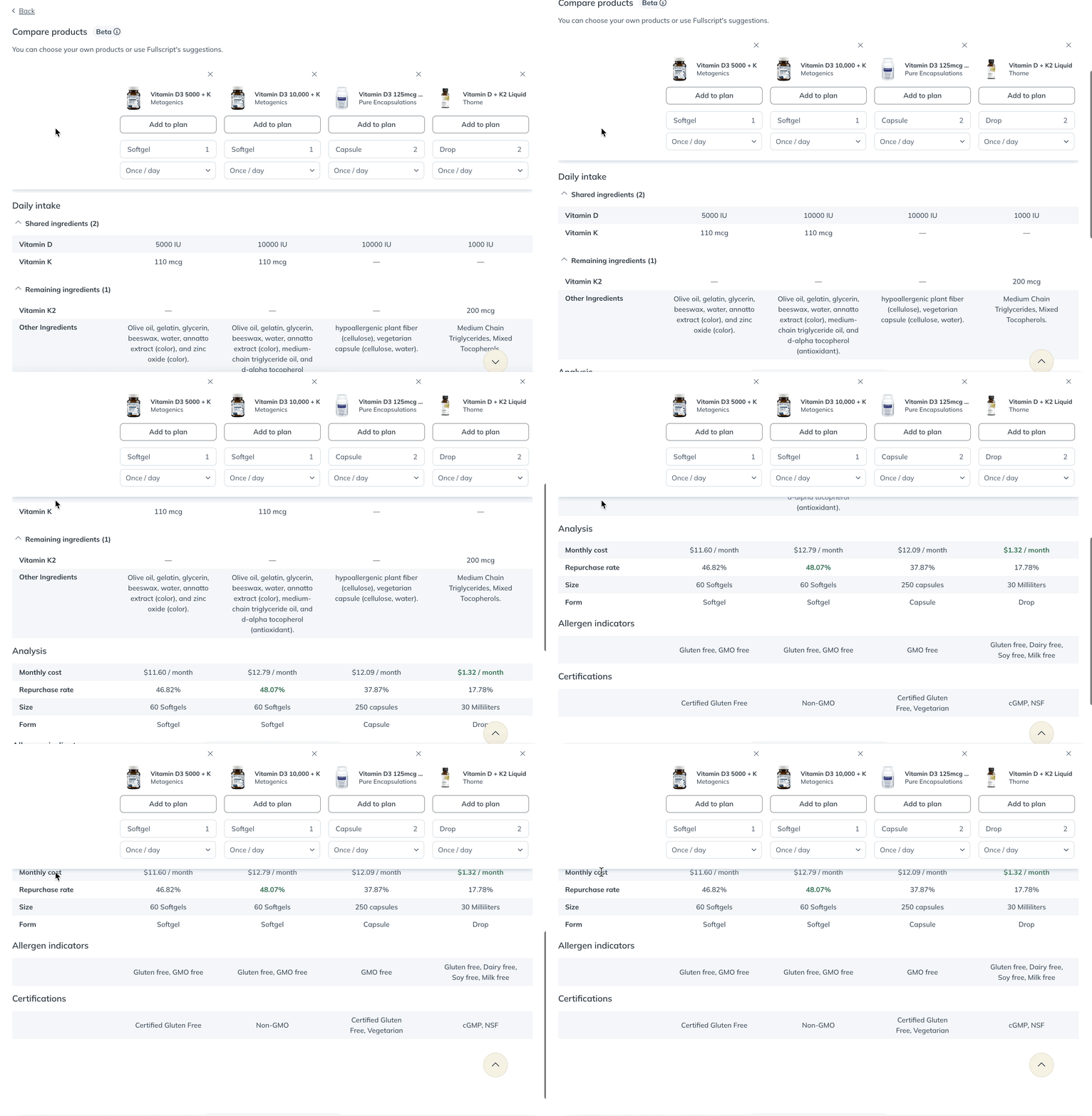
Use Smart product comparisons to view and compare alternatives side by side using Fullscript product data and adherence insights. This can help you evaluate single- and multi-ingredient products while staying in your plan-building workflow.
How to compare products
You can compare products in two ways:
From a product display page:
- Select a primary product and set dosage instructions or keep the default.
- Select Compare similar products. This button appears when smart comparisons are available.

From the Patient plans catalog:
- Select the products you want to compare.
- Check Compare in the lower-left corner of each product card.
How to interpret results
Tags below each product highlight why it appears in the comparison (for example, lower cost, fewer units to reach the same dose, or higher repurchase rate).
The comparison table groups details into four categories: Daily intake, Analysis, Allergen indicators, and Certifications.
Limitations of Smart product comparisons
Smart product comparisons are available in the plan-building catalog on most single and dual-ingredient products and some multi-ingredient products (US-only). The tool serves up alternative products that best meet the ingredient dosing requirements of your initial selection. The alternatives we suggest are based on having the same ingredients but with the best options for patient preference (price, format, refill rate, etc).
Products with smart comparisons available have a Compare products button below the dosage instructions. If a smart comparison isn’t available on a product, you can browse similar products, curated by our Integrative Medical Advisory team.
Similar products in the wholesale catalog
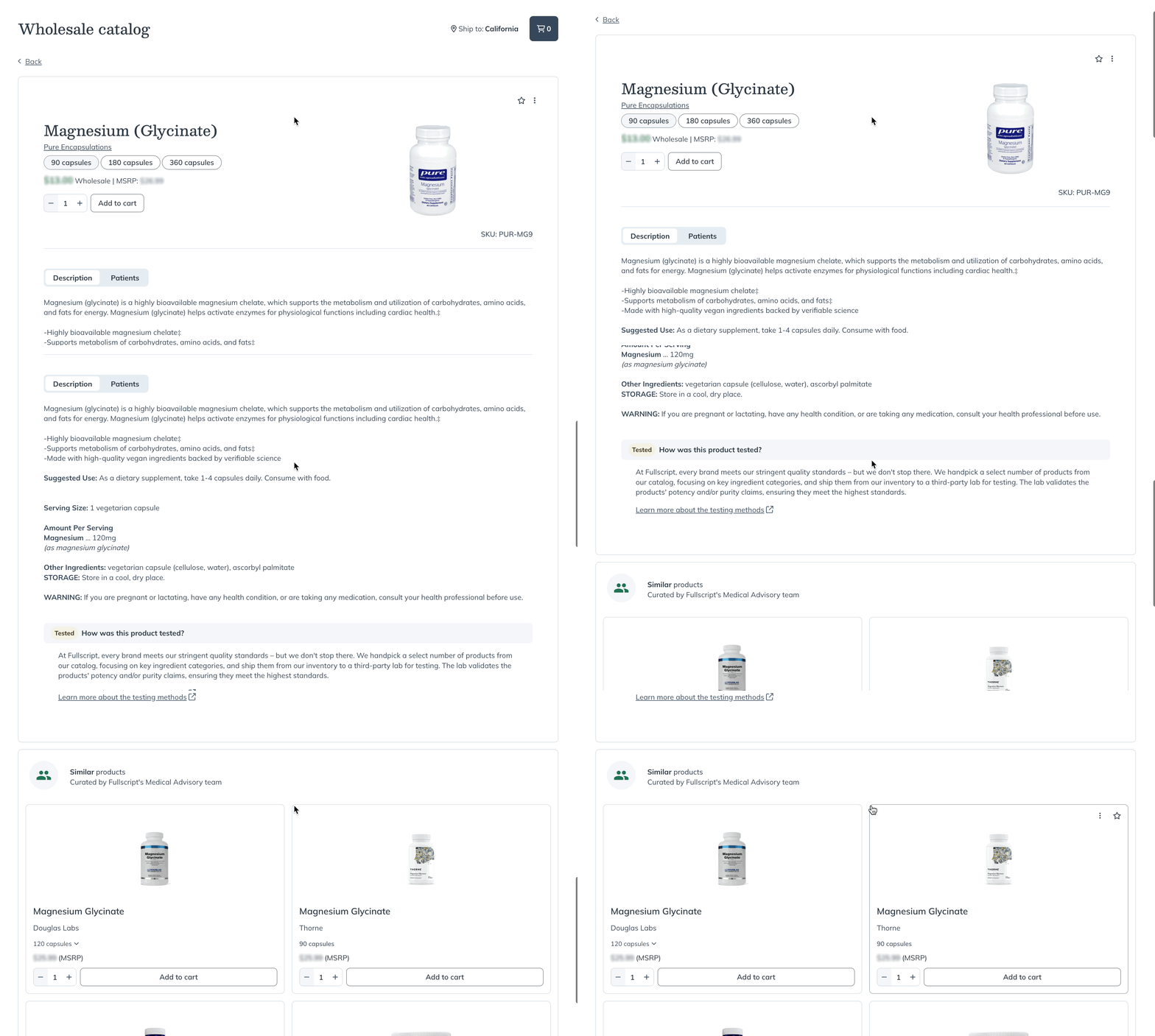
When searching for products in the wholesale catalog, you can browse similar products from the product’s display page.
To find similar products in the catalog:
- Search for a product in the catalog.
- Select a product card to view the product display page.
- Scroll down to the Similar products heading at the bottom of the page.
- Select a similar product to read its description and ingredients.
Similar products in the Product substitution tool
The Product substitution tool helps you keep patients on track by bringing at-risk products to your attention. A product is considered at-risk if it’s been removed from the catalog or is on long-term backorder—meaning it may not be available when patients need a refill. To make swaps simple, the tool suggests similar products, helping you update plans quickly.
